



If you’ve been reading about dropshipping for five minutes, you’ve probably already heard about Shopify, right? It’s one of the most popular e-commerce platforms for a reason: it makes it relatively simple to launch an online store and start selling products without handling inventory yourself.
Now… how hard is Shopify dropshipping, actually? And more importantly… how do you build a store that not only looks good, but can actually grow into a real business over time?
If questions like these are on your mind, you’re in the right place. In this guide, I’ll cover how Shopify dropshipping works, what you need to get started, how to build your store step by step, and the common beginner mistakes to avoid.
I’ll also show how to do it faster and easier with automation tools. For instance, BuildYourStore is an AI Shopify Builder that helps create a ready-to-launch dropshipping store in minutes, making the setup process much simpler for beginners.
Why Start a Shopify Store?
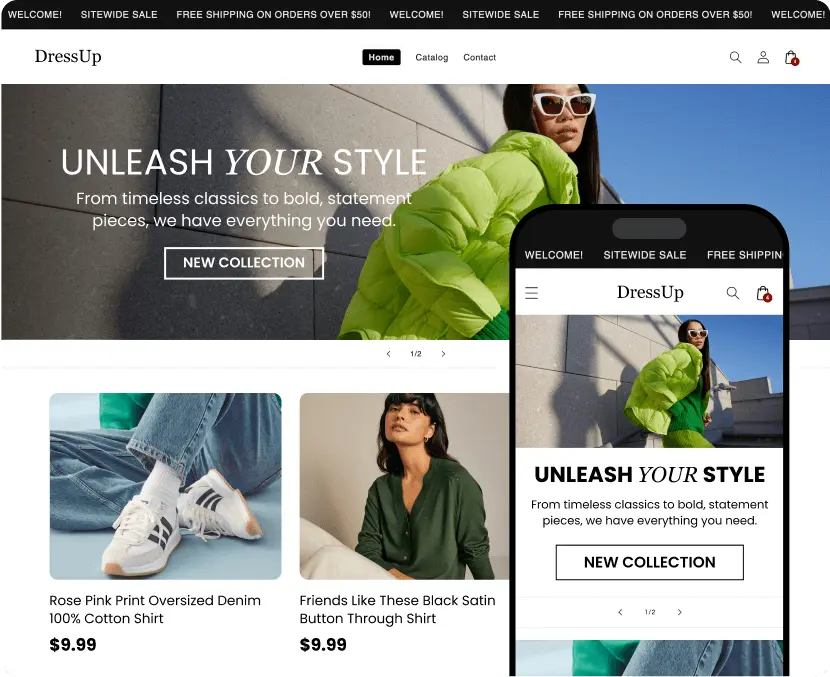
There’s a reason Shopify became one of the most popular e-commerce platforms in the world: its simplicity. Shopify is designed with beginners in mind, making it super easy and quick to launch an online store without needing advanced technical skills or a huge upfront investment.
In fact, Shopify includes an intuitive drag-and-drop editor and ready-made templates, making it especially beginner-friendly for people with little to no technical experience.
Another major advantage is its ecosystem. Shopify’s integrations are one of its main strengths. It connects with almost everything you’ll need: payments, shipping, email, marketing, and ads.
This includes dropshipping integrations that let you connect automation tools like AutoDS for product imports, order fulfillment, inventory updates, and shipping management.
At the same time, everything is centralized in an all-in-one dashboard where sellers manage products, orders, customers, and performance analytics.
That said, Shopify isn’t a “get rich quick” shortcut. Running a successful store still requires a strategy… You know: product research, branding, and ongoing testing. But compared to building an e-commerce website from scratch, it’s one of the most beginner-friendly ways to get started.
Key Steps Before You Start
Alright, first things first; before you hit play on your Shopify store and start selling, let’s prep the ground. How? By paying attention to the following:
Choose Your Niche
Picking your niche is a key stop on a dropshipper’s roadmap. It’s not the same to choose an evergreen niche like fashion, baby products, or pet supplies as it is to go for a more seasonal strategy (e.g., Christmas items).
Also, it’s not just about chasing the “most profitable niche.” If everyone is selling the same thing, you can end up in a saturated market. Be smart and take your time to choose a category that balances solid demand with manageable competition. Most niches let you go deeper into subcategories where you can specialize and stand out.
Some basic tips for choosing your niche:
1. Analyze demand: Tools like Google Trends help you understand the size and traits of the audience for a given niche, including interests, location, and behavior.
2. Look for growing demand with manageable competition: Validate steady or rising interest on Google Trends, Amazon, social networks, and marketplaces. Avoid markets saturated or dominated by big brands.
3. Evaluate logistics: Pick lightweight, low-cost, easy-to-ship products to minimize supplier issues and delivery delays. Products that don’t require complex personalization or heavy post-sale support are preferable.
4. Study reviews and customer feedback: Scan opinions to spot strengths and weaknesses in current products, and identify improvement opportunities or risks.
5. Consider fit with trends and lifestyles: Niches tied to DIY, health, sustainability, smart tech, or pet products tend to stay profitable and keep growing.
6. Stand out with customization or added value: For example, Print-on-demand lets you offer unique items with better margins—great for standing out in competitive niches.
Research Your Audience
Just like you study the market, you need to study your audience, like… really get to know them. If you’re part of that audience yourself (say, you love tech gadgets), you’ll likely understand it better.
Analyze demographics (age, gender, location), buying behavior, and pain points related to the niche. What problems are they trying to solve with your product? How do they prefer to buy: mobile, desktop, or apps? Creating buyer personas helps focus your messaging and design so your store meets real needs.
Plan Your Products
Decide whether you’ll run a dropshipping model or manage your own inventory. Dropshipping removes the need to store products and lowers risk, but choosing reliable suppliers is crucial to avoid quality issues or shipping delays.
Plan stock and logistics in advance if you choose to have your own inventory. In both cases, pick products that fit your audience and are viable in terms of costs, shipping, and support.
Set Goals
Define clear, measurable goals before launching your store. These might include revenue targets, web traffic, conversion rate, or customer-base growth within a specific period (e.g., 1,000 monthly visitors or a 3% conversion rate in the first three months).
Specific goals guide decisions on design, marketing, and tool selection, and make it easier to track progress and adjust your strategy as you grow.
Step-by-Step Guide: Start Your Shopify Store Using BuildYourStore
Alright, this is where it gets fun! If you thought you needed coding skills, design chops, or a full team to build a Shopify store, forget it (or go that route, but here I’ll show you a much faster one).
I’ll share how to dropship on Shopify with one little trick: automation. BuildYourStore simplifies the setup process by using AI to generate a functional, ready-to-launch Shopify store in minutes. Here’s how:
1. Sign up for BuildYourStore
Sign up for BuildYourStore by heading to the official site. You need just basic info to get started. You can choose a free plan or a premium plan with more features.

2. Choose your niche
Before creating your store, pick a niche. As I said above, focus on demand, competition, your interests, and current trends.
This decision impacts your strategy, of course, but it also impacts how BuildYourStore builds your store (pun intended). Each niche has its own design, vibe, and structure, so the overall look and structure of your store should reflect that from the start.

3. Pick your first visuals
As a first step, BYS offers six banner options so you can choose your look and feel. To try it out, I selected the “Pets” niche. From there, BuildYourStore’s AI generates a store from scratch based on your preferences.

4. Review your AI draft (optional but recommended)
In just a few seconds, the system generates a ready-to-launch site, packed with a home site, product pages, a menu, and essential pages (like policies and terms and conditions). Once it’s ready, glance through the initial layout, sections, and suggested copy. You can tweak later; this is just to make sure the overall structure and design match your idea.
5. Connect to Shopify
Follow the simple on-screen steps to create your Shopify account (basic registration info, like any sign-up flow). Once you’re in, copy your store URL into the BYS page.
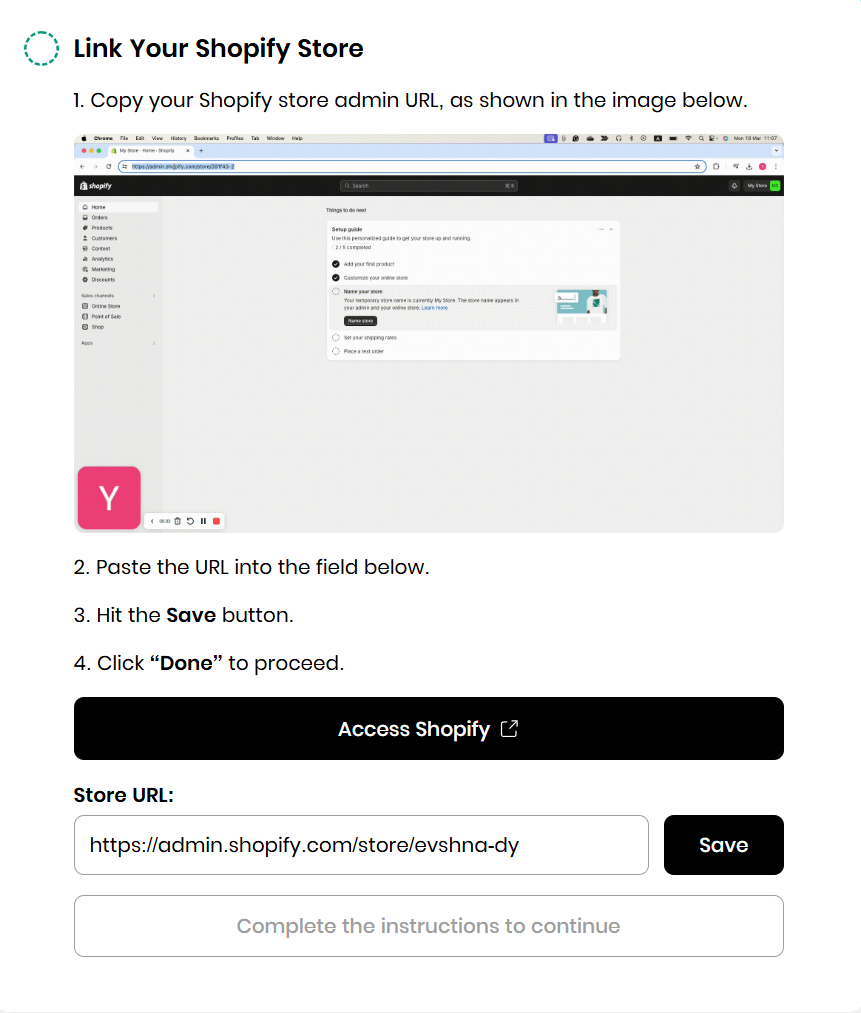
6. Install the BYS app
Add the BuildYourStore app to your Shopify so everything syncs smoothly.
7. Choose your store type
If you’re just starting out, go with the Free Beginner Store and upgrade to Professional later. If you’ve been dropshipping for a while and know your way around, jump straight to Professional.

8. Let the magic happen
Your store is being created! Now simply connect with AutoDS by following the on-screen steps to receive your ready-to-go store and add products.
After that, you can customize any details you want to get closer to the “dream store” you have in mind.
Optimizing Your BYS Shopify Store

Have you noticed how some painters start with broad lights and shadows and then zoom in on the details? That’s precisely where we are. It’s time to add the smaller brushstrokes to this work of art that is your dropshipping store.
To optimize your Shopify store once it’s live, focus on these key areas to boost performance, attract more visitors, and turn them into customers:
SEO (Search Engine Optimization)
Search engine optimization (SEO) is the process of improving your website so it can rank higher on search engines like Google and attract organic traffic from people actively searching for products or information related to your niche.
Don’t worry, you don’t have to be an expert to do this. Just make sure to create unique, compelling meta titles and descriptions for every page and product, including relevant keywords people actually search for. This improves your Google rankings and click-through rates.
Also, use alt texts on all images to improve accessibility and help search engines understand your visuals, which supports your store’s SEO.
User Experience (UX)
Nowadays, most people do many tasks from their phones, and shopping is no exception. That is why you must ensure easy access to your pages and that they respond well.
In other words, user experience (UX) refers to how easy and smooth it is for a customer to navigate a site or a store. The goal is to design pages so users can perform all the actions they need from any device (mobile, desktop, iPad, and so on).
Think about this: if you are scrolling on Instagram, see an ad for a jacket you like, click to open the page, and the screen keeps loading, or the page is blank or unclear where to buy, you instantly close it and look elsewhere. That is precisely what you need to prevent from happening to your customers. And that’s where UX comes in.
The good news is that both Shopify and BuildYourStore provide sites where UX is already structured around e-commerce best practices, helping beginners start with a cleaner, more user-friendly foundation. This way, you don’t really need coding or design experience. But, as a general rule of thumb, always:
- Double-check and test your site on every device, just to make sure it all works well.
- If you tweak or customize design and structure details on your site, do so with the user experience in mind. A cleaner layout, simple navigation, fast-loading pages, and clear product information usually perform far better than overly complicated designs trying to do too much at once.
Product Pages
Product pages on Shopify are simply your product listings. Think about a product listing on Amazon or eBay. Well, here is pretty much the same, except for the fact that you have much more control over the branding, layout, product descriptions, images, and overall customer experience.
To optimize these pages, it is key to always have high-quality images, videos, or GIFs. You can upload products from different angles or one illustrative photo and another showing how it is used. The goal is to be creative in finding the most attractive way to present the product to your buyers.
The same goes for descriptions. As you mentioned earlier, details matter. Let’s put it into an example:
👉 Imagine shopping for furniture and finding a product description that only says “large square table.” Not exactly convincing, right?
👉 Now compare that to a listing with clear dimensions, organized information, high-quality images, and a well-written description with no spelling mistakes. This one instantly feels more trustworthy and professional.
All in all, it’s about ensuring that customers find trust signals everywhere on your website that make them want to buy from you.
Checkout
Lastly, an essential step to optimizing your store is keeping things simple and realistic. What do I mean by that? Be honest with your customer and don’t force unnecessary steps. Simplify the checkout process: remove unnecessary steps, enable guest checkout, and offer popular, secure payment methods.
Also, be transparent about costs, shipping times, and return/exchange policies. If these aren’t clearly stated, you’re likely to face problems when an order issue arises.
Marketing Your Shopify Store

You’ve got the store and the products; now you need the bridge that connects it all to your audience: marketing. Running a diversified strategy that blends social media, email, paid ads, and inbound marketing is key to growing a Shopify store. Here are the essentials:
Social Media Strategies
We live in the age of social media, and your business can’t sit out of that virtual world. TikTok and Instagram are great thermometers for what’s viral and trending, but they’re also excellent platforms to showcase products in different formats, depending on your target audience.
If you want to reach an older segment, Facebook may work better; if you aim to hit younger audiences, TikTok will be your ally. These decisions all come back to what I said earlier: know your market and your audience deeply to optimize your business to the max. Here are a few best practices:
- Use short videos, like Reels and Stories, to showcase products in a realistic, engaging way.
- Tap into hashtags and trending sounds to boost reach.
- On Facebook, build niche communities with Pages and Groups. Share useful content and promos and answer questions to foster loyalty.
- Don’t forget to interact with users. Reply to comments, talk with your followers, and encourage user-generated content to increase trust and social proof.
Email Marketing Automation
Email marketing and newsletters can significantly boost your visibility. You can leverage data from shoppers who abandoned checkout or completed a purchase to offer personalized discounts and promos and open a new communication channel that builds trust and credibility for your brand.
Use platforms like Klaviyo or Mailchimp to set up automated flows: welcome series, abandoned carts, special promos, and personalized recommendations.
You can also segment by behavior and preferences so that every message is relevant, leading to higher open rates and conversions.
Paid Ads & Influencer Collaborations
Paid advertising is always a solid shortcut to gain visibility, as long as you know your audience well enough to target correctly and reach the people you actually want.
Influencers are another great way to boost sales; they don’t need to be celebrities with millions of followers. You can work with micro-influencers who have built respected communities, and if they align with your niche, they can help you gain followers and engagement organically.
Content Marketing & SEO
Create blogs, guides, and videos around your niche to attract organic traffic and position your brand as the go-to. Optimize for SEO: relevant keywords, internal/external links, and solid metadata. Then, you can distribute that content via social media and newsletters to widen your reach and keep steady traffic flowing to your store.
Choose the strategies that fit your goals and your way of working. You don’t have to pick just one mix and match for better results!
Scaling Your Shopify Store & Mistakes To Avoid

You’ve got the store and a rough outline of your marketing strategies, so what’s next? It’s time to scale and prevent mistakes that could become expensive down the road.
When it comes to scaling, your first move should be adding more products beyond the 10 curated items that BuildYourStore gives you. This is where you roll up your sleeves: research your niche and expand your catalog. Keep testing to see what performs best and swap out underperformers.
Also, if growth is the goal, you can’t ignore automation. The Shopify ecosystem gives you access to platforms with practical integrations. Tools like AutoDS make life easier for dropshippers by automating order fulfillment, product importing, price and stock monitoring, and other repetitive and time-consuming tasks that are done manually.
Automation doesn’t just make your operation more efficient; it also frees up time and energy so you can focus on high-priority parts of the business and make better, faster decisions.
Lastly, be smart and leverage Shopify’s integrations to sell across multiple channels, including Instagram Shop, Facebook Marketplace, TikTok Shopping, Amazon, and eBay. A multi-channel strategy boosts visibility and sales by meeting customers who spend their time online.
Mistakes To Avoid With Your Shopify Dropshipping Store
Now let’s look at some common mistakes to avoid, especially if you’re new to Shopify dropshipping:
- Not customizing BYS’s default store enough: Sticking too closely to the default BuildYourStore template can make your brand feel generic. Invest time in branding; logo, colors, fonts, and original content, to build a memorable identity that resonates with your audience.
- Ignoring mobile optimization: With mobile traffic dominating e-commerce, a slow or clunky mobile site costs sales. Test and optimize rigorously for easy navigation, fast loading, and a smooth checkout on phones and tablets.
- Skipping SEO or marketing planning: Launching without a clear SEO strategy or marketing plan limits organic growth. Prioritize keyword research, content production, and targeted ad campaigns early to build sustainable traffic.
- Relying solely on curated products without testing demand: Even though BYS offers curated items, don’t assume they all work in your market. Continuously test, gather feedback, and analyze sales to double down on winners and retire underperformers; this is how you protect margins.
Frequently Asked Questions
How much does BuildYourStore cost?
BuildYourStore (BYS) has a free plan, with optional premium upgrades for advanced features.
Can I customize the store created with BYS?
Yes, you can totally customize store creations with BuildYourStore. You can modify themes, colors, logos, product listings, and other branding elements.
How many products come preloaded with BuildYourStore?
Each BYS store starts with 10 curated products, which you can edit, add to, or replace.
Do I need a Shopify subscription to use BuildYourStore?
Yes, you do need a Shopify account to use BuildYourStore, especially to publish your store once it’s ready. Both platforms support the integration, so it only takes a couple of clicks to connect them.
Start Faster Your Shopify Store With BYS
Starting a Shopify dropshipping store in 2026 is more accessible than ever. Shopify gives you the foundation to build and manage an e-commerce business, while tools like BuildYourStore simplify store creation and setup, getting your store live much faster.
BuildYourStore provides everything you need to get your Shopify site up and running in minutes, including a pre-built storefront, curated products, ready-to-use product pages, branding elements, and a beginner-friendly setup designed to simplify the launch process.
From there, growth comes down to testing products, understanding your audience, improving your marketing, and optimizing your operations over time.
For more insights and expert tips, check out our blog:


