



Importing products from AliExpress to Shopify is, hands down, one of the best ways to get a dropshipping store off the ground. But if this is your first time doing it, the whole process can feel messier than it actually is.
The upside? In 2026, importing products is faster and cleaner than it’s ever been. Get the workflow right, and you can pull items from AliExpress into your Shopify store in minutes, then dress them up so they read like part of your brand.
That’s exactly what this guide breaks down: choosing the right import method, connecting your store, and setting shipping expectations your customers won’t come to resent. By the end, you’ll come out the other side with a Shopify catalog that looks and runs like a professional built it.
What You Need Before Importing AliExpress Products

Good news first: the checklist here is short. You don’t need a stack of tools or a computer science degree to get Shopify dropshipping with AliExpress up and running. Just a handful of essentials, and once you’ve got them lined up, the actual import feels almost too easy. Here’s what has to be in place:
- A Shopify store: Obvious, maybe, but worth saying out loud: this is where everything you import will live, get dressed up, and eventually sell. You need a store that’s up and running before a single product can land in it.
- A dropshipping app: A dropshipping platform like AutoDS connects Shopify with AliExpress. It’s what lets you pull in products, keep an eye on inventory and price shifts, and automate order fulfillment. Sure, you can do this manually. But the moment your store starts growing, you’ll be glad you didn’t.
- An AliExpress account: Free, quick to set up, and your ticket into a catalog with millions of products and suppliers just waiting to be imported.
Once these essentials are in place, the next step is choosing the best method for importing products and preparing them for a professional-looking Shopify store.
🆕 Beginner’s Tip: Don’t have a Shopify store yet? BuildYourStore can generate a ready-to-customize store in just a few minutes, helping you skip the initial setup and get straight to product sourcing. If you’d like to learn more, check this guide on how to build a Shopify store in 5 minutes.
How To Import Products From AliExpress To Shopify Step By Step
Importing products from AliExpress into Shopify is a straightforward process once the right setup is in place. While different tools may vary slightly, the overall workflow remains the same: connect your store, import products, customize your listings, and publish them for customers.
The four steps below walk through that process from start to finish, helping you build a professional-looking product catalog that’s ready to sell:
Step 1️⃣: Choose Your Import Method
A couple of paths exist for getting AliExpress products into your Shopify store, and which one fits you comes down to a simple trade-off: how much automation do you want handling the busywork, versus how much control do you need over shipping speed? Here’s how they stack up.
| Method | Best for | Main advantage | Weakness |
|---|---|---|---|
| Dropshipping platform | Beginners and growing stores | Imports products, syncs inventory, and automates fulfillment | Requires connecting your Shopify store and supplier accounts |
| Manual CSV import | One-off imports or custom catalogs | No additional software required | Time-consuming and requires manual order processing |
If you’re just starting out, an automation platform is going to make your life easier, full stop. It takes the repetitive stuff off your plate. AutoDS, for instance, pulls products straight from AliExpress, keeps inventory and pricing synced without you lifting a finger, and smooths out order fulfillment as your store scales.
Manual CSV imports haven’t gone away, and there’s nothing wrong with them. They just make more sense for the occasional upload than for running an active dropshipping business day to day.
That’s why the rest of this guide leans into the automated route. Plenty of platforms can do this, and the process looks similar across most of them, but AutoDS is a solid stand-in here: it shows you, step by step, what the fastest and most efficient version of this workflow actually looks like.
Step 2️⃣: Connect Your Shopify Store and AliExpress

With your method decided, it’s time to connect your Shopify store to AliExpress through whichever automation platform you picked. This connection is what turns two separate systems into one: products, inventory updates, price changes, and order info all start flowing back and forth.
Using AutoDS? Here’s the rundown:
- Sign in to your AutoDS account and connect your Shopify store.
- Link your AliExpress account from the AutoDS dashboard.
- Double-check that your store and supplier accounts are actually talking to each other before you import anything.
The whole setup takes just a few minutes, but don’t skip that last check. A solid connection is what keeps your product info in sync down the line and lets orders process on autopilot instead of landing on your to-do list.
Step 3️⃣: Find And Import Products To Your Store
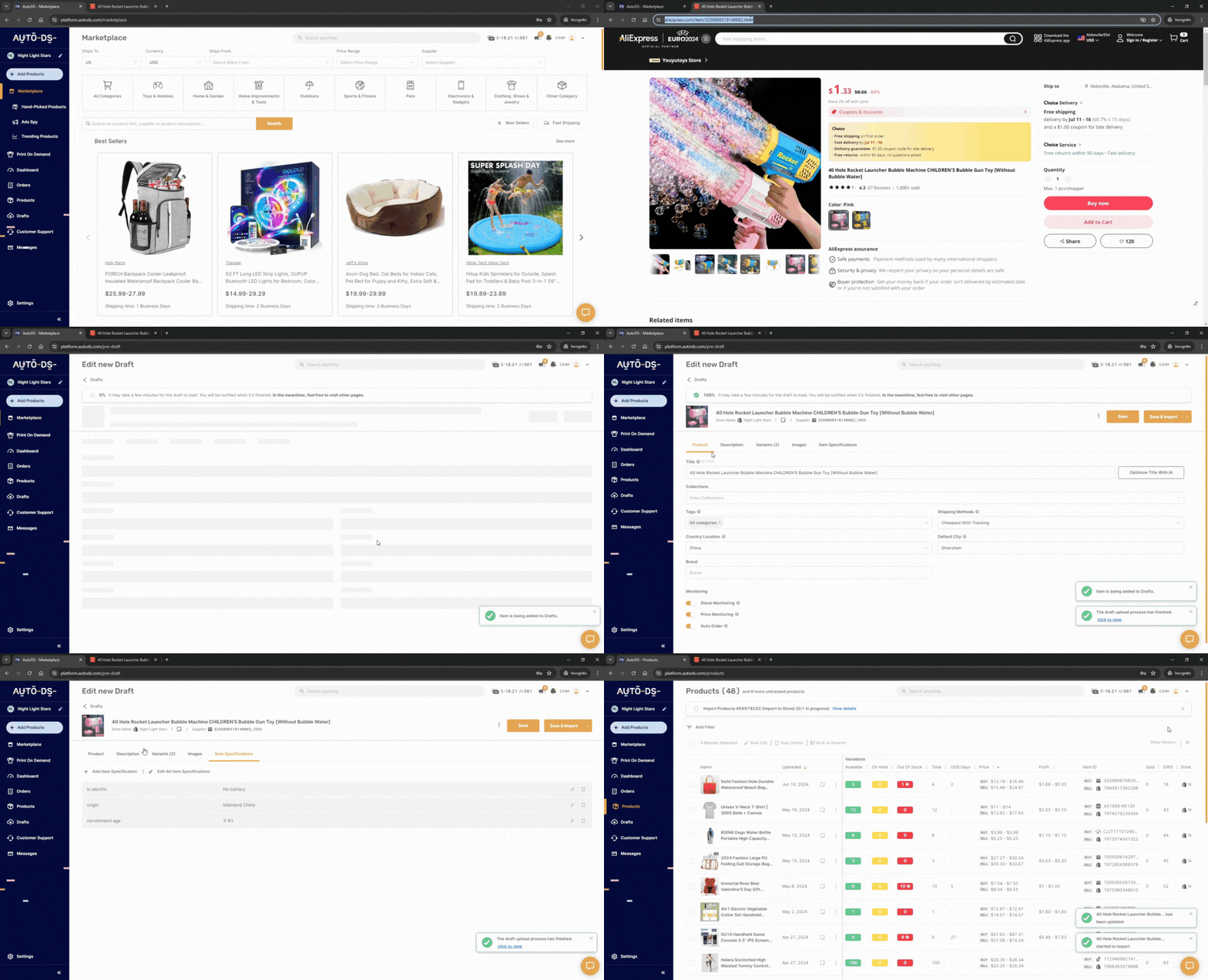
With your accounts connected, it’s time to start importing products. AutoDS makes this process simple through its Product Importer, which offers two different options depending on how you want to build your catalog.
If you’re testing a new product or carefully curating your store, choose Single Product. This option imports one product into a single Shopify store, making it ideal for researching products one by one before publishing them.
If you’re building a larger catalog or managing multiple stores, Multiple Products lets you import several products at once, saving time and reducing repetitive work as your business grows.
After selecting your preferred option:
1️⃣ Copy the AliExpress product URL.
2️⃣ Paste it into the AutoDS Product Importer.
3️⃣ Review the draft of the imported product.
4️⃣ Hit publish!
Importing products is only the first step. Before making any product live, it’s important to review the listing, adjust the content, and ensure it reflects your brand rather than the original supplier’s page.
💡 Pro Tip: Don’t dump dozens of products on day one. Import a single low-cost item first and watch it move through the system. If that one item behaves, you’re clear to scale up with confidence.
Step 4️⃣: Edit Your Listings Before Publishing

Importing a product is only half the battle. What comes through from AliExpress was written for a marketplace, not for your brand. So before you hit publish on anything, it’s worth going through every listing with a fine-tooth comb: that’s what makes the difference between a page that looks professional and one that screams “dropshipped.”
Here’s what to look at:
- Titles. Ditch the long, keyword-stuffed supplier titles (“2026 New Arrival Wireless Bluetooth Headset Noise Canceling Sport”) for something a real person would actually search for or click on. Clear, short, on-brand.
- Descriptions. Supplier copy tends to read like a spec sheet nobody asked for. Rewrite it around what the customer actually cares about. Benefits first, features and specs after, all in language that sounds human.
- Images. Strip out watermarks, supplier logos, and the five duplicate angles of the same product. Keep only the shots that look like they belong on a page you’d trust with your own money.
- Variants. Trim the list down to the sizes and colors you’re genuinely planning to sell. Fewer, clearer options beat an overwhelming dropdown every time.
None of this is just cosmetic, either. A well-optimized listing sells more easily, reads better, and tends to convert better, too.
💡 Pro Tip: Doing this by hand for every single product works fine for ten items. At two hundred, it’s a full-time job. That’s where AutoDS’s AI Product Title & Description Generator earns its keep: a few clicks, and supplier copy turns into polished, conversion-ready listings.
How To Price AliExpress Products For Profit On Shopify
A pricing strategy that actually protects your margins has to account for everything riding on that sale: supplier cost, payment processing fees, advertising, and even the returns you haven’t gotten yet. Look past the sticker price of the product itself, and your margins start looking a lot healthier.
A good starting point for AliExpress dropshipping: a 2.5x to 4x markup over your total landed cost. The right number shifts depending on your niche and how crowded it is, but that range usually leaves enough room to cover overhead and still walk away with a real profit.
As a rule of thumb, healthy dropshipping stores land somewhere around 20% to 30% gross margin per sale. But here’s the part people underestimate: advertising costs usually move the needle more than what you paid the supplier. A pricier product with a cheap CPA will often out-earn a bargain-bin item that costs a fortune to advertise.
Then there’s the psychology of it. Prices ending in .99, a realistic Compare at Price, product bundles—none of these tricks are new, but they work because they nudge perceived value upward without touching your actual costs. Small levers, real impact on average order value.
And pricing isn’t a “set it and forget it” situation. Keep an eye on supplier costs, ad performance, and margins as things shift. It’s what keeps you competitive instead of scrambling to catch up six months from now.
💡 Pro Tip: Suppliers change prices and stock without so much as a heads-up, and that can quietly eat your margins overnight. AutoDS’s Automatic Price & Stock Monitoring keeps your Shopify listings in step with what’s actually happening on the supplier side.
How To Handle AliExpress Shipping Times
Ask any new dropshipper what keeps them up at night, and shipping times will come up sooner or later. Fair enough, but here’s the thing: long delivery windows don’t have to tank your business. More often than not, whether a customer’s happy has less to do with how fast the box shows up and more to do with whether you told them what to expect before they clicked “buy.”
A few habits go a long way toward a smoother post-purchase experience:
✅️ Be upfront about delivery times: Put an estimated shipping window right on the product page. Nobody likes surprises when it comes to “where’s my stuff.”
✅️ Speed things up where it counts: For your best sellers, look into suppliers with local warehouses. Shaving days off delivery for your top products pays off more than shaving them off everything.
✅️ Give customers a way to track their order: A branded tracking page does double duty: it keeps people in the loop and keeps your inbox from filling up with “is my order coming?” messages.
As your catalog grows, it’s worth revisiting which products earn the faster fulfillment treatment. Move your highest-demand items to suppliers who can get them there quicker, and you’ll likely see it pay off in repeat customers and a shopping experience that holds its own against the competition.
Frequently Asked Questions
Can you import AliExpress products to Shopify for free?
Yes, you can import AliExpress products to Shopify for free by adding them manually, although this process can be time-consuming if you’re managing a large catalog. If you prefer to automate imports and other tasks, platforms like AutoDS offer a $1 trial, giving you access to even more features like inventory synchronization and pricing automation.
What is the best app to import AliExpress products to Shopify?
Several automation platforms support AliExpress imports, but AutoDS stands out by combining product importing with inventory synchronization, automatic pricing updates, and order fulfillment in a single platform.
How do I connect AliExpress to Shopify?
The process usually takes just a few minutes. Connect your Shopify store to an automation platform like AutoDS, link your AliExpress account, and you’ll be able to import products directly from AliExpress with just a few clicks.
How long does AliExpress shipping take to customers?
Shipping times vary by supplier and destination, but international orders typically take 10–25 business days. You can reduce delivery times by working with suppliers that offer local warehouses, while always displaying realistic shipping estimates to set clear customer expectations.
Start Importing Smarter, Not Harder
Getting products from AliExpress into Shopify is just the opening move. What actually decides whether your store sticks around is everything that comes after: picking the right products, polishing your listings, and pricing with real margins in mind. None of these are dramatic changes on their own, but stack them together, and that’s what separates a store that plateaus from one that keeps climbing.
If doing all of that by hand sounds like a second job you didn’t sign up for, a dropshipping automation platform like AutoDS takes most of it off your plate: importing, syncing inventory, adjusting prices, all from one place. Get that workflow humming, and you’ll spend a lot less time babysitting your store and a lot more time actually growing it.
🚀 Don’t have a Shopify store yet? You can try BuildYourStore to get a free AI-built store up and running in minutes. From there, it’s a straight line: start pulling in AliExpress products right away and shape your brand from day one.
Ready for the next chapters? Continue sharpening your skills with the following reads:


