




Starting an online Shopify store is always exciting, but it can also feel overwhelming. You have to customize your theme, create product pages, list your products, set up payments, and even pick a name for your store. And, while Shopify makes things simple without code, simple doesn’t always mean quick, especially if you’re trying to launch fast.
That’s where AI store builders come in. BuildYourStore (BYS) is an AI store builder that helps streamline the setup process by generating store templates and preloading products, aiming to reduce the time it takes to launch a Shopify store.
In this article, we’ll share a step-by-step guide on how to start a Shopify store from scratch. We’ll also break down the differences between the traditional setup and using BYS for full speed and automation.
What Is Shopify?

If you are diving into the e-commerce world, you’ve probably heard about this little platform called Shopify. And by “little”, we’re just being funny. With millions of stores around the world, Shopify is one of the world’s most popular e-commerce platforms.
So, what makes it so popular? To put it simply, users love its beginner-friendly approach. Anyone can build a Shopify store without code or design skills. No hiring a developer or using a dozen tools to make it work. In most cases, you can choose a theme, add your products, set up payments, and prepare your store for launch within a relatively short time, depending on how customized you want your setup to be.
Plus, Shopify handles the heavy tech side, like hosting and security, and offers third-party apps and integrations to complement its set of features.
The result? A full-on digital shop with everything you need to show your products, sell, and manage your business from one place.
But here’s the thing (yes, there’s always a thing): starting completely from scratch can feel overwhelming if you have zero experience or if you simply don’t have the time to figure out every setting, integration, and design tweak.
Because while Shopify makes the process possible, it doesn’t always make it effortless. And that’s where a store builder like BuildYourStore can be your best friend when launching your Shopify store.
Traditional Shopify Store Setup: A Brief Overview

As we’ve mentioned, building a store is not complex. But it does require rolling up your sleeves and handling everything yourself. Here’s how to set up a Shopify store, the traditional way:
- Sign up for Shopify. Create your account and choose your plan.
- Select a theme. Pick from Shopify’s free or paid templates as the foundation for your store.
- Customize your design. This step often requires more time and attention, especially if you want your store to look consistent and aligned with your brand.
- Add products manually. This step can become time-intensive, especially if you’re working with a large product catalog.
Of course, this is all doable and pretty intuitive. But it’s not always a fully plug-and-play process, especially for beginners. First, because it’s time-consuming: each step requires patience, especially if you’re uploading dozens or hundreds of products.
Second, because you do need some skills, or at least a good eye for design, and some technical comfort to make your store look polished.
And third, doing things manually leaves room for potential inconsistencies in branding. Manually tweaking everything can lead to branding that feels uneven or incomplete.
Bottom line? Building a Shopify store from scratch is completely manageable, but it typically requires time, attention to detail, and some trial and error—especially if you’re aiming for a polished result.
Step-by-Step Guide: Starting a Shopify Store with BuildYourStore
We’ve covered what a traditional store setup looks like. Now, if you’re wondering how to start a Shopify store quickly and easily, BuildYourStore introduces a more automated approach to store setup by using AI to handle several of the initial steps
But before we dive into the process, let’s take a step back: what is BuildYourStore, exactly? It’s an AI-powered platform that creates a pre-structured Shopify store with essential elements already in place, helping reduce the amount of manual setup required before launch.
Let’s see how to start a Shopify store from scratch using BuildYourStore, step by step:
Step 1: Create A BuildYourStore Account

First things first. Head over to BuildYourStore.ai and create your account for free. This is super easy, just fill in your name, email, and password, and that’s it.
⏱️Estimated time: under a minute
Step 2: Select Your Niche

The first step in the setup process is selecting your niche. You will encounter six options:
- Fashion and apparel
- Pets
- Electronics and gadgets
- Home and garden
- Sports and fitness
- I’m not sure
This step is crucial, since the niche you’re choosing will guide the AI to build your store around that specific market, complete with tailored products, design, and structure.

The next step is to select banners for your store. The system will provide six options based on your niche, and you have to select your two favorites for your store’s homepage. For example, if you chose the Pets niche, you will find six banner alternatives related to pet stores, dogs, and cats.
⏱️Estimated time: a few seconds
Step 3: Connect To Your Shopify Store
The next step is to create your Shopify account. The system gives a direct URL plus instructions to do it quickly (like skipping the initial questions by clicking “Skip All”).

Once you create your Shopify account and store, which just takes a few seconds, you have to paste your Shopify store admin URL into the BYS setup so the platform can connect directly and start building your store.

Then, the setup guide walks you through starting your Shopify trial, where you’ll add your payment details, and connect BYS to Shopify—which, by the way, is literally just one click.
Tip: Don’t know how to name your store? No worries, you don’t have to waste time on this either. Try BYS’s AI Shopify Business Name Generator and get unique names for free.
⏱️Estimated time: around a minute
Step 4: Customize Your Store

Now, it’s time to let the system customize your store. The best part? Most of the initial setup is handled automatically, with minimal input required from your side.
If you want to edit something, you can just go to your Shopify account, head to “Online Store” and click “Customize”. This gives you flexibility to tweak details and fully match your branding. But this is not necessary to launch, as BYS makes sure to set everything up.
Tip: If you pick the Professional One plan, you also get to choose your high-converting Shopify custom theme from a variety of designs and layouts.
⏱️Estimated time: handled automatically
Step 5: Connect To AutoDS To Add Products

At this stage, you can choose to connect a product sourcing and dropshipping automation tool like AutoDS to access products and streamline operations. This is super quick:
1. Click “Register to AutoDS”.
2. Enter your email address and name, set your password, and click “Join Now”.

3. When selecting your selling channel, choose “Shopify”.

4. Choose your AutoDS plan. If this is your first time using AutoDS, you can get started with the 14-day trial for just $1. Then, choose a payment method and fill in your billing information.

5. On the AutoDS dashboard, connect your account to your new Shopify store. To do this, just head over to the sidebar, click “Add store”, and choose Shopify. Then click on “I have a Shopify store – Connect it to AutoDS”. After that, follow the instructions to continue with the process.

6. Finally, go back to the BYS setup process and click “Done” to move forward.
⏱️Estimated time: a couple of minutes
Step 6: Review Preloaded Products

BuildYourStore automatically adds 10 products to your store based on the niche you selected initially. You can also use AutoDS’s marketplace to explore more products in your niche and continue adding more items.

The last step of the setup process confirms your store is ready and asks you to review the products. Head to your new store, explore the site, review your 10 curated products, and make necessary adjustments.
⏱️Estimated time: under a minute
Step 7: Launch Your Store
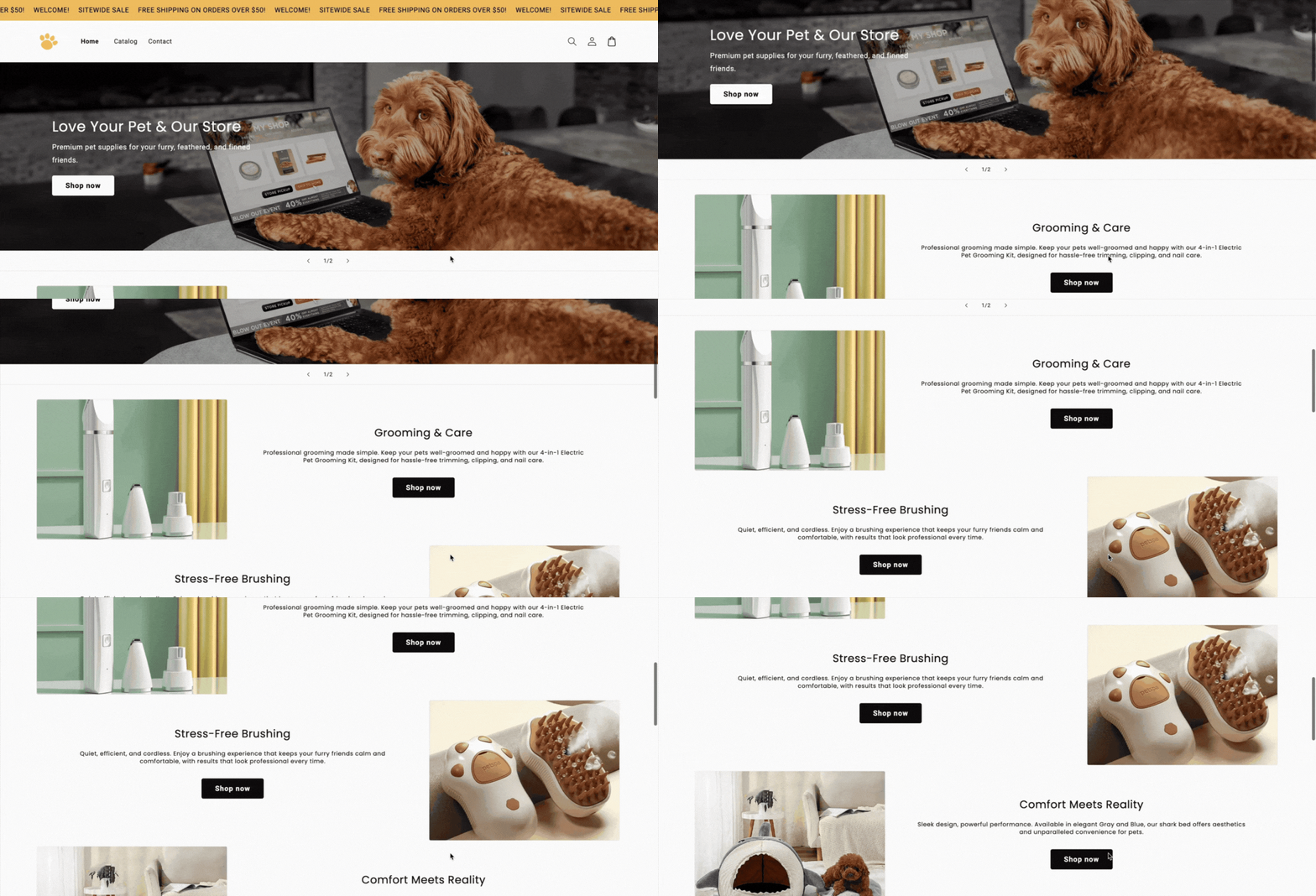
All good? Then it’s time to publish your new Shopify store! If you haven’t already, make sure you add a store address. Otherwise, Shopify won’t publish it, and it will protect it with a password. Also, from the Shopify dashboard, you can set up payments, review your shipping rates, and customize your Shopify domain.
Once it’s published, you can launch your Shopify marketing campaigns to start driving traffic to your site.
⏱️Estimated time: under a minute
And there you go. In just a few minutes, you get a structured Shopify store with key elements already in place, giving you a solid starting point to finalize setup, review details, and begin preparing for launch.
BuildYourStore vs. Traditional Shopify Setup: A Comparison
So, what’s the real difference between getting hands-on with the traditional Shopify setup and letting BuildYourStore handle the heavy lifting? Let’s compare them side by side.
Traditional Shopify Setup:
- Strong DIY approach. You’re in charge of everything, from design and product uploads to settings and branding.
- Takes time. Expect to spend hours (or days) customizing, editing, and testing before your store feels ready.
- Basic skills needed. While Shopify is beginner-friendly, having some basic design or technical understanding can help you create a more polished final result.
- Flexibility. If you’re setting up your store yourself, you have way more control. But that also means you are responsible for every single detail. While some sellers want that level of flexibility, others prefer to skip the logistics and cut straight to the chase.
BuildYourStore Setup:
- AI-powered. BuildYourStore creates a ready-to-sell Shopify store tailored to your niche in minutes—all with artificial intelligence.
- Saves time. With design, layout, and products already loaded for you, you can skip the logistics and launch quickly.
- Beginner-friendly. No coding, no design background, no problem. BYS takes care of the foundation of your store so you don’t have to.
- Consistency. Colors, fonts, layouts, and product pages are all aligned from the start. This gives your store a professional look without extra effort, money, or time.
TL;DR 👉 The traditional Shopify setup offers more control and flexibility, but it requires more time and hands-on work. BuildYourStore simplifies the process by automating many of the initial steps, which can help you launch faster with less manual setup.”
Benefits of Using BuildYourStore To Start A Shopify Store
Using BuildYourStore isn’t just about speed—it’s about simplifying the early stages of setting up a Shopify store.
First, there’s time efficiency. Instead of building everything from scratch, the platform sets up key elements like your store structure, design, and initial product selection. This can noticeably reduce the time it takes to move from idea to a working store, especially if you’re starting from zero.
Second, it offers a low barrier to entry. You can begin without upfront costs, and decide later if you want to upgrade or customize further as your store evolves.
Third, it’s designed to be accessible for beginners. While some level of review and adjustment is still recommended, most of the initial setup is handled automatically. This can make the process easier to navigate if you don’t have prior experience with e-commerce platforms.
Another advantage is built-in consistency. Since the store is generated as a complete structure, elements like layout, colors, and product pages are aligned from the start. This can help create a more cohesive look without needing to configure everything manually.
Finally, there’s room to scale. The initial setup includes a starting product selection, but you’re not limited to it. As your store grows, you can expand your catalog, test new products, and integrate additional tools depending on your needs.
The main takeaway? BuildYourStore helps reduce the amount of manual work required at the beginning, giving you a structured starting point that you can refine and build on over time.
Frequently Asked Questions
Is BuildYourStore free to use?
Yes, BuildYourStore offers a free plan with optional premium features for advanced customization.
Can I add more products to my store after setup?
Yes, you can add more products to your store. After setting up BuildYourStore, you can manually add more listings or integrate with reliable Shopify suppliers to expand your inventory.
Do I need a Shopify subscription to use BuildYourStore?
Yes, a Shopify subscription is required to launch your store, but BuildYourStore assists with the initial setup, providing all the links and step-by-step guidance to do it quickly.
How does BuildYourStore compare to other AI store builders?
The difference between BuildYourStore and other AI store builders is that BuildYourStore focuses on automation, speed, and ease of use, which may appeal to beginners looking for a simplified setup process.
Build A Shopify Store Today!
Now you know how to set up a Shopify store. The main takeaways?
👉 It doesn’t have to be overwhelming.
👉 The traditional setup gives you full control but takes time, patience, and a few design twists.
👉 BuildYourStore simplifies several technical steps and reduces the amount of manual setup required, making it easier to get started.
BYS includes design, branding, and products, so you can skip the tech stress and focus on growing your business.
The best part? You can get started with BuildYourStore for free. No coding, no design degree, no endless setup. Just a smooth path from idea to storefront. Build your free store today!
Want to learn more about how to run an online business? Check out these articles:


