



Privacy policies don’t sound like the most exciting thing to set up on a new store, but they’re absolutely necessary, and you need to pay attention to them before you make your first sale.
Basically, this part of your store is what assures your customers you’re handling their information responsibly, from the moment they add something to cart to the moment their order ships.
Below you’ll find a ready-to-use Shopify privacy policy template you can copy, paste, and customize in a few minutes, along with a quick guide on what to include, the basics of the GDPR and CCPA you need to know, and where to publish it.
Copy-Paste Shopify Privacy Policy Template
A quick note: This is a starting template, not legal advice. Review it with a qualified lawyer before publishing to ensure it aligns with your business, the regions you sell to, and the type of data you collect.
Privacy Policy
[Store Name] collects personal information to process orders, improve your shopping experience, and communicate with you.
Information We Collect
Information you provide directly: name, email, shipping/billing address, phone number, and payment details. (Payment information is processed directly by Shopify Payments or your payment gateway — it is not stored by [Store Name].)
Information collected automatically: IP address, browser/device type, pages visited, cookies, and data from analytics or advertising tools we use, such as [Google Analytics, Meta Pixel, TikTok Pixel — list the tools your store actually uses].
How We Use Your Information
We use your information to fulfill orders, send order updates, send marketing emails (only if you’ve opted in), improve our store and marketing efforts, and prevent fraud.
Cookies
We use cookies to keep your cart working correctly, understand how visitors use our store, and run ads. [Add a line here if your store uses a cookie consent banner.]
Third-Party Sharing
We share information with service providers who help us run our store, including: [list your payment processor, shipping carrier, email marketing platform, and any installed apps that handle customer data].
Your Rights
If you’re in the EU/UK (GDPR), you have the right to access, correct, or delete your personal data, and to withdraw consent for marketing at any time.
If you’re in California (CCPA), you have the right to know what data we collect, request its deletion, and opt out of the sale of your data. (Most small stores don’t sell customer data — but this disclosure is still expected.)
To exercise any of these rights, contact us at [support email].
Data Retention
We keep your information only as long as necessary to fulfill your order and meet our legal and tax obligations.
Children’s Privacy
[Store Name] does not knowingly collect information from children under [13/16 — this age varies by region, check which applies to you].
Changes to This Policy
We may update this policy from time to time. This version was last updated on [date].
Contact Information
Questions about this policy? Contact us at:
[Store Name]
[Support email]
[Physical address]
What a Shopify Privacy Policy Must Cover
Here’s what each part of the template above actually covers, and why it matters:
- What data you collect: Split clearly into what customers give you directly (name, email, address, payment details) and what you collect automatically (IP address, device info, cookies, pixels). Lumping these together is one of the most common mistakes in DIY policies.
- How you use that information: A plain-language list: fulfilling orders, order updates, email marketing (only if opted in), improving your store, and fraud prevention.
- Cookies: A short note on what they’re used for (cart functionality, analytics, ads), and whether you’re running a cookie consent banner.
- Third-party sharing: This is store-specific, so you’ll need to list your actual payment processor, shipping carrier, email platform, and any apps installed on your store that touch customer data. There’s no generic way to pre-fill this one.
- Customer rights (GDPR/CCPA): Your policy needs to state what rights customers have and how to exercise them.
- Data retention: One line on how long you keep customer data. It’s a small clause, but it’s one of the most commonly missing pieces in competitor policies.
- Children’s privacy: A standard clause stating you don’t knowingly collect data from children, with the age threshold adjusted depending on whether GDPR or COPPA applies to you.
- Changes to the policy: A line noting the policy can be updated, plus the date of the last revision.
- Contact information: Your store name, support email, and physical address. Most privacy laws require this to be reachable, not just implied.
GDPR and CCPA Basics for Shopify Stores
You don’t need a law degree to put together a compliant privacy policy, but it helps to understand the basics of the two regulations most dropshippers run into.
GDPR (General Data Protection Regulation)
Applies if you have customers in the EU or UK, regardless of where your store is based. Under GDPR, customers have the right to:
- Access the personal data you hold about them
- Correct inaccurate data
- Request deletion of their data
- Withdraw consent for marketing at any time
CCPA (California Consumer Privacy Act)
Applies if you have customers in California and meet certain revenue or data volume thresholds (check the current thresholds, as they’re periodically updated). Under CCPA, customers have the right to:
- Know what data you collect about them
- Request deletion of their data
- Opt out of the sale of their data
You don’t need separate policies for GDPR and CCPA; the template above already includes both sets of rights as short subsections. Just make sure the contact method for “exercising these rights” actually works and is checked regularly, since these aren’t just formalities; customers and regulators can both follow up on them.
How to Add Your Privacy Policy in Shopify
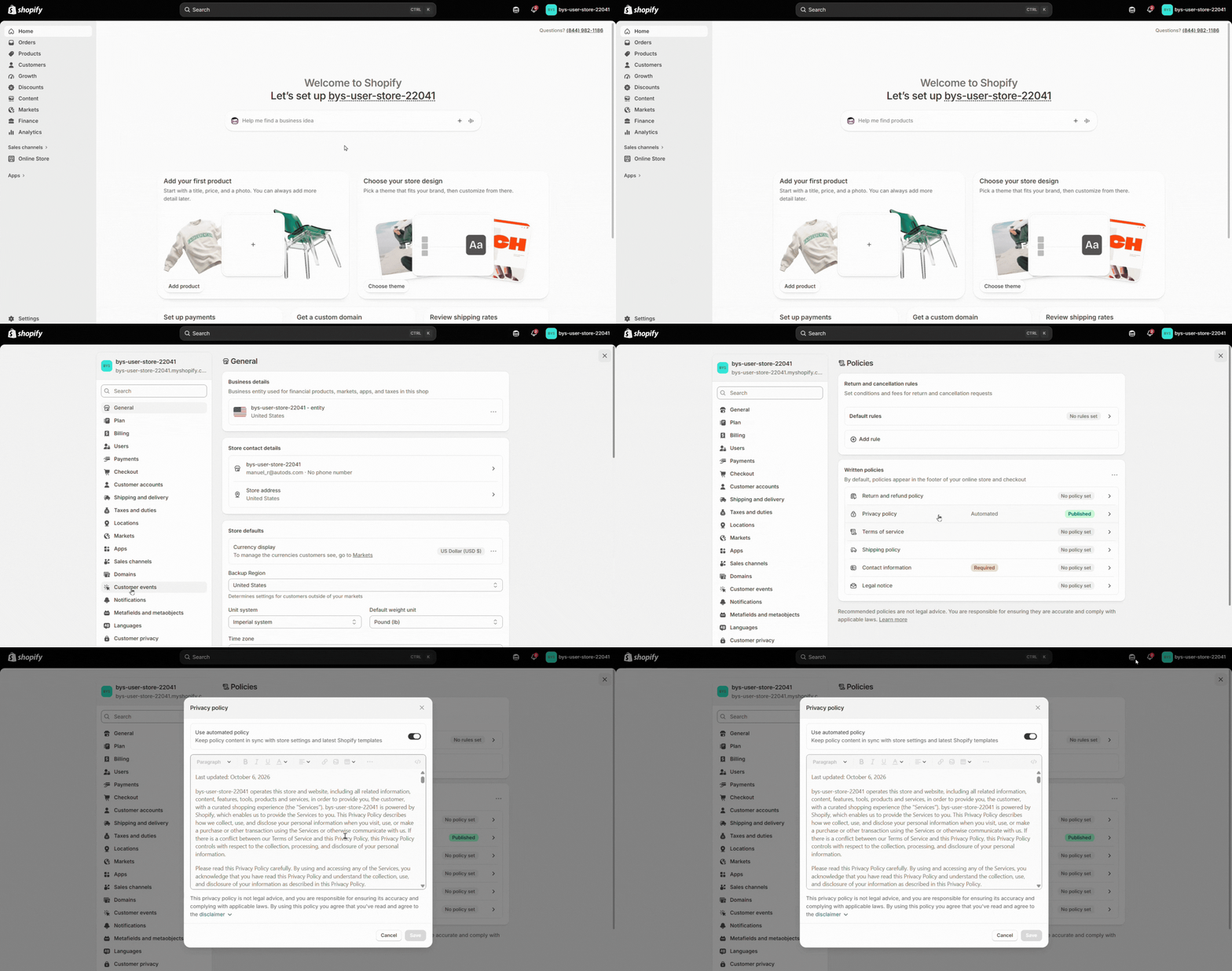
- From your Shopify admin, go to Settings > Policies.
- Scroll to the Privacy policy section and paste in your customized template (or click Create from template to start from Shopify’s default and edit it from there).
- Click Save, and this automatically links the policy from your checkout page.
- Add the policy link to your footer and main menu too: go to Content > Menus, open the menu you want to update, and add a menu item linking to your Privacy Policy.
Why a Lawyer Should Review Your Final Policy
As we mentioned before, this template covers the essentials, but it’s not a finished legal document. This is where we need to draw the line between educational content and legal advice, which you’ll need for:
- Selling internationally. If you have customers outside your home country, you may be subject to privacy laws beyond GDPR and CCPA, and some regions have stricter requirements than others.
- Handling sensitive data with care. If your store collects anything beyond standard order information, health-related products, data about children, or biometric information, for example, those categories often come with additional legal obligations that a generic template won’t cover.
- Staying on top of changing laws and policies. Privacy regulations get updated, and a policy that was compliant when you published it may need revisions down the line.
A quick legal review before launch is a small cost compared to the risk of an inaccurate or incomplete policy, especially as your store scales beyond your home market.
Frequently Asked Questions
Do I need a privacy policy on Shopify?
Yes, most payment processors and ad platforms require one, and it’s also expected by data protection laws if you have customers in regions like the EU or California.
Is a privacy policy required for GDPR compliance?
Yes, if you have customers in the EU or UK. GDPR requires you to clearly disclose what data you collect, how you use it, and how customers can exercise their rights over it.
Where do I add a privacy policy in Shopify?
In your Shopify admin, under Settings > Policies.
Can I use a free privacy policy generator?
You can, but generic generators often produce long, generic documents that don’t reflect what your specific store actually collects or which apps you use. The template above gives you the same essentials in a shorter, more store-specific format.
Is Shopify’s built-in privacy policy generator enough?
It’s a solid starting point and covers the basics, but like any generic generator, it won’t account for store-specific details like which third-party apps you use or region-specific requirements — those still need manual customization.
What should a Shopify privacy policy include?
At minimum: what data you collect, how you use it, cookie usage, third-party sharing, customer rights under GDPR/CCPA, data retention, and contact information.
Conclusion
A clear privacy policy builds trust with your customers and keeps you compliant from day one. Copy the template above, fill in your store’s specifics, publish it, and pair it with your shipping, refund, and return policies to have your policy pages fully covered before launch.
Remember, if you don’t have your Shopify store yet, you can build one quickly and efficiently with BuildYourStore! Just choose your niche and preferences, and get a ready-made virtual storefront with products already set up and ready to sell.


