- What Is WISMO?
- How Shopify Order Tracking Works
- How To Add Shipping Tracking On Shopify
- How To Add A Tracking Page To Your Store
- Shopify Tracking VS A Dedicated App
- Best Shopify Order Tracking Apps
- Where AutoDS Fits For Dropshippers
- International And Dropshipping Tracking
- Tracking Apps Reduce Support Messages
- How To Choose A Tracking App
- FAQ
- Conclusion

If you run a Shopify store, chances are you’ve dealt with a “Where is my order?” (WISMO) question at least once. And if you haven’t, you probably will. It’s one of the most common customer inquiries, especially when shipping from overseas suppliers.
But there’s no need to panic. Shopify order tracking helps customers stay informed without contacting support. The platform offers free tracking through shipping notifications and the Shop app, while dedicated tracking apps add branded tracking pages and proactive delivery updates.
In this guide, we’ll explore Shopify’s built-in tracking features, compare the best tracking apps, and explain how to handle common shipping issues in dropshipping.
What Is WISMO, And Why Dropshipping Makes It Worse
WISMO stands for “Where Is My Order?” and refers to customer inquiries about the status or location of their purchases. It’s one of the most common reasons shoppers contact online stores, especially when delivery updates are unclear or delayed.
For dropshipping stores, these questions can be even more frequent. International shipments often take longer to arrive, and the first tracking update may take several days to appear. On top of that, unfamiliar foreign carrier names and long gaps between tracking scans can make customers think their package is lost or stuck, even when it’s moving normally.
Shopify Order Tracking: What’s Built In (And Free)
Shopify includes built-in order-tracking features at no extra cost, so you don’t need a third-party app to keep customers updated on their shipments. Let’s see what you can do with Shopify’s native tools:
1. Add tracking numbers and carriers
When you fulfill an order, you can add the tracking number and select the shipping carrier directly from your Shopify admin. If you purchase a shipping label through Shopify, this information is added automatically.
2. Send shipping confirmation emails
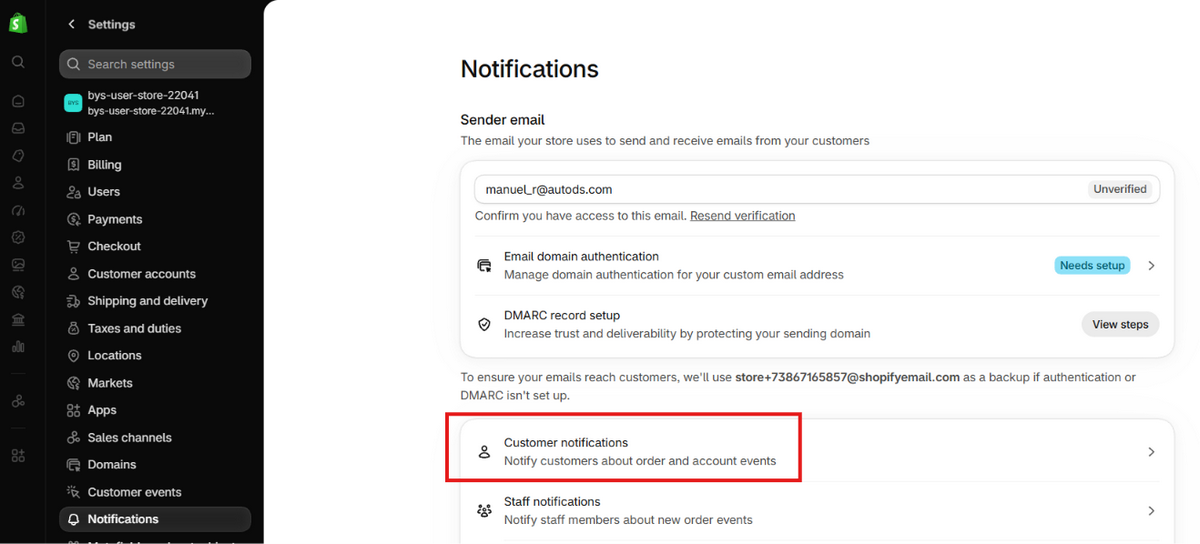
Once an order is fulfilled, Shopify can send customers a shipping confirmation email with their tracking information and a link to the order status page. You can manage these notifications under Settings > Notifications > Customer notifications.
3. Let customers check their order status
Every Shopify store includes an order status page where customers can check their shipment’s progress. They can access it through their shipping confirmation email or customer account. For supported carriers, Shopify can display real-time shipping updates.
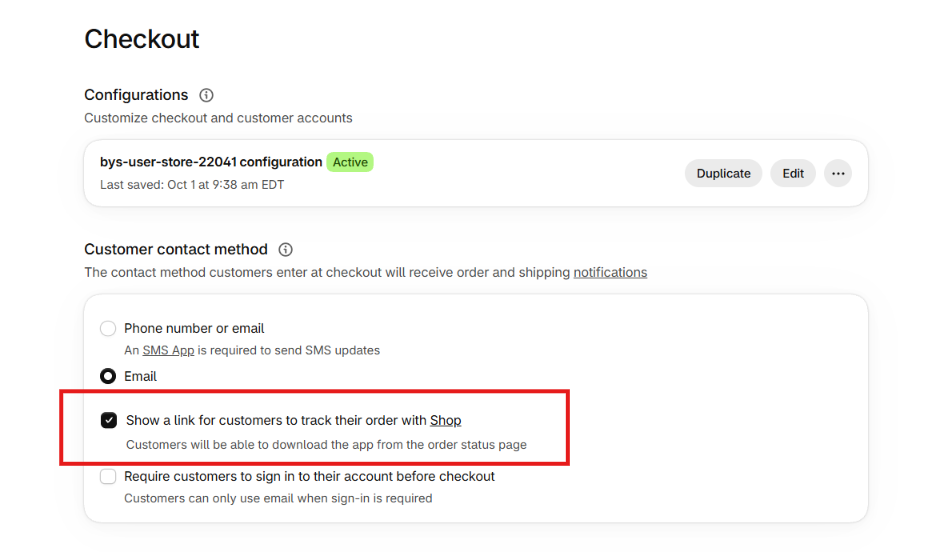
4. Offer tracking through the Shop app
Shopify’s free Shop app lets customers track their orders, receive delivery notifications, and view estimated delivery dates. Orders automatically sync with a customer’s Shop account using their verified email address. Customers can also access Shop through the Track with Shop option on the order status page.
What Shopify’s Built-In Tracking Doesn’t Do
While these features cover the basics, there are some limitations:
- No standalone branded tracking lookup page: Shopify’s order status page can be customized, but it isn’t the same as a dedicated page where customers enter their order number to track a package.
- Limited control over proactive notifications: Shopify offers shipping emails and Shop app notifications, but dedicated tracking apps provide more options for customized alerts and communication.
- Carrier-dependent tracking updates: Some shipping carriers aren’t fully supported, meaning customers may need to visit the carrier’s website to see their package’s progress.
For stores that need more customization or want to keep the entire tracking experience on their website, a dedicated tracking app may be worth considering.
How To Add Shipping Tracking On Shopify
Setting up Shopify shipping tracking is simple and doesn’t require any additional apps. Here’s how to do it:
1. Open the order: Go to Orders in your Shopify admin and select the order you want to update.
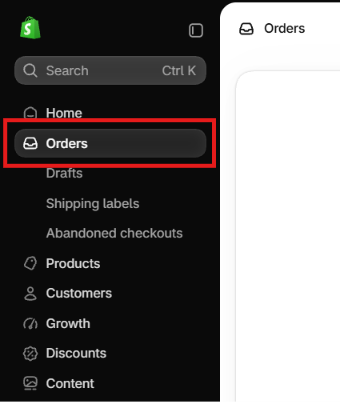
2. Fulfill the items: In the Unfulfilled section, click Mark as fulfilled.
3. Add tracking information: Enter the tracking number and select the shipping carrier. If Shopify doesn’t recognize the carrier, select Other and provide the tracking URL.
4. Notify your customer: Make sure Send shipment details to your customer now is checked.
5. Complete the fulfillment: Click Fulfill items, then go to Settings > Notifications > Customer notifications to review your Shipping confirmation email template.
How To Add A Tracking Page To Your Shopify Store
Shopify already includes a customizable order status page, but if you want a dedicated tracking page where customers can look up their shipments directly from your store, you’ll need a third-party app.
Here’s how to set one up:
1. Install a tracking app: Visit the Shopify App Store and choose an app that offers a branded tracking page, such as 17TRACK, AfterShip, or Track123.
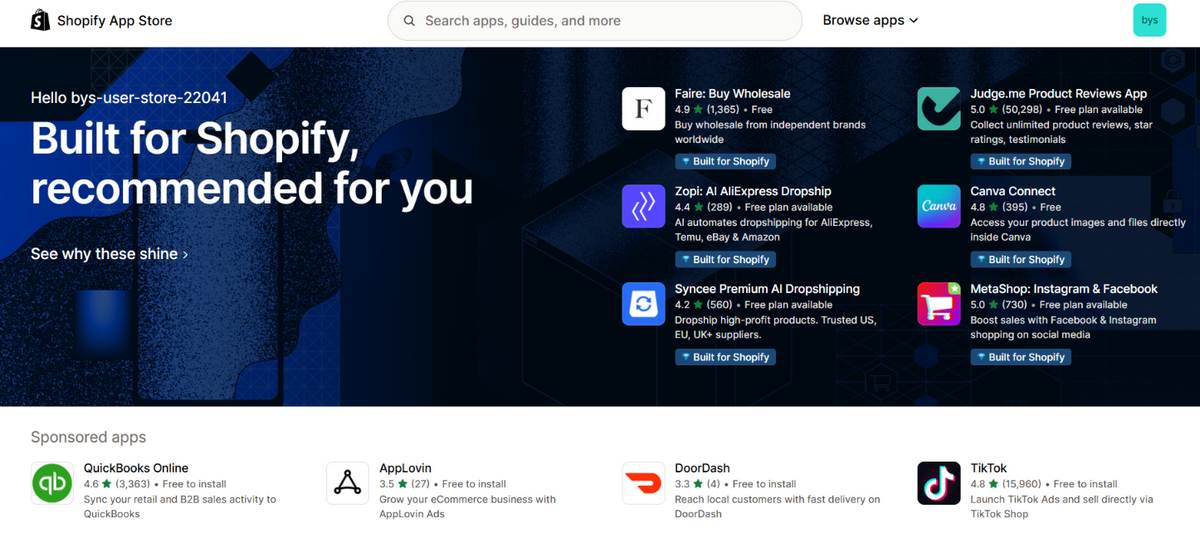
2. Enable the tracking page: Open the app in your Shopify admin and follow the setup instructions to activate it.
3. Customize the design: Add your store’s logo, colors, and branding to make the tracking page feel like part of your website.
4. Add it to your store’s navigation: Go to Content > Menus in Shopify, select your main or footer menu, and add a link labeled “Track Your Order” pointing to your new tracking page.

5. Test the page: Use a real or test order with valid tracking information to confirm that customers can look up their shipments and see the correct shipping updates.
Shop App Tracking vs A Dedicated Tracking App
Shopify’s Shop app and dedicated tracking apps both help customers follow their orders, but they offer different levels of customization and control.
Here’s how they compare:
| Feature | Shopify + Shop App | Dedicated Tracking App |
|---|---|---|
| Customer experience | Customers use their order status page or Shop | Customers can look up shipments directly on your website |
| Branding | Customizable order status page; Shop has its own interface | Branded tracking page with more design options |
| Order tracking | Order status page and tracking through Shop | Dedicated tracking lookup page on your store |
| Cost | Included at no extra cost | Free plans available; paid plans offer additional features |
| Shipping notifications | Shipping emails and Shop delivery notifications | Customizable email and SMS updates, depending on the app and plan |
| Carrier support | Tracking updates for supported carriers | Often supports a wider range of international carriers |
Which One Should You Choose?
It depends on your situation. If you’re just starting out, Shopify’s built-in tracking features may be enough to keep customers informed without additional costs.
On the other hand, if you’re handling international shipments or receiving frequent WISMO inquiries, a dedicated tracking app can give you more control over the tracking experience and customer communications.
Best Shopify Order Tracking Apps: Free Plan Limits Compared
| App | 20 Orders/Month | 100 Orders/Month | 300 Orders/Month |
|---|---|---|---|
| CWILL | $0 | $11 | $16 |
| Track123 | $0 | $9 | $9 |
| TrackingMore | $0 | $9 | $14 |
| AfterShip | $0 | $11 | $27 |
| 17TRACK | $0 | $9 | $49* |
On 17TRACK, the Pro plan is $49 and covers up to 1,000 shipments. The app does not publish a smaller-plan overage rate in its Shopify listing.
- At 20 orders per month, all five apps offer a free plan that can cover your tracking needs.
- At 100 orders per month, you’ll generally need a paid plan, with prices starting at $9 to $11 per month.
- At 300 orders per month, the differences become more noticeable. Track123’s $9 Growth plan covers up to 300 orders, while CWILL and TrackingMore offer lower-tier plans with additional-order fees. AfterShip’s Essentials plan costs $27 at this volume when calculated with its published overage rate.
Where AutoDS Fits For Dropshippers
Automation and dropshipping can be a powerful combination, especially when you use an all-in-one dropshipping tool like AutoDS to simplify tedious, repetitive tasks and streamline your daily operations.
In this case, AutoDS retrieves tracking numbers from supported suppliers and syncs them to your Shopify store, so you don’t have to enter them manually.
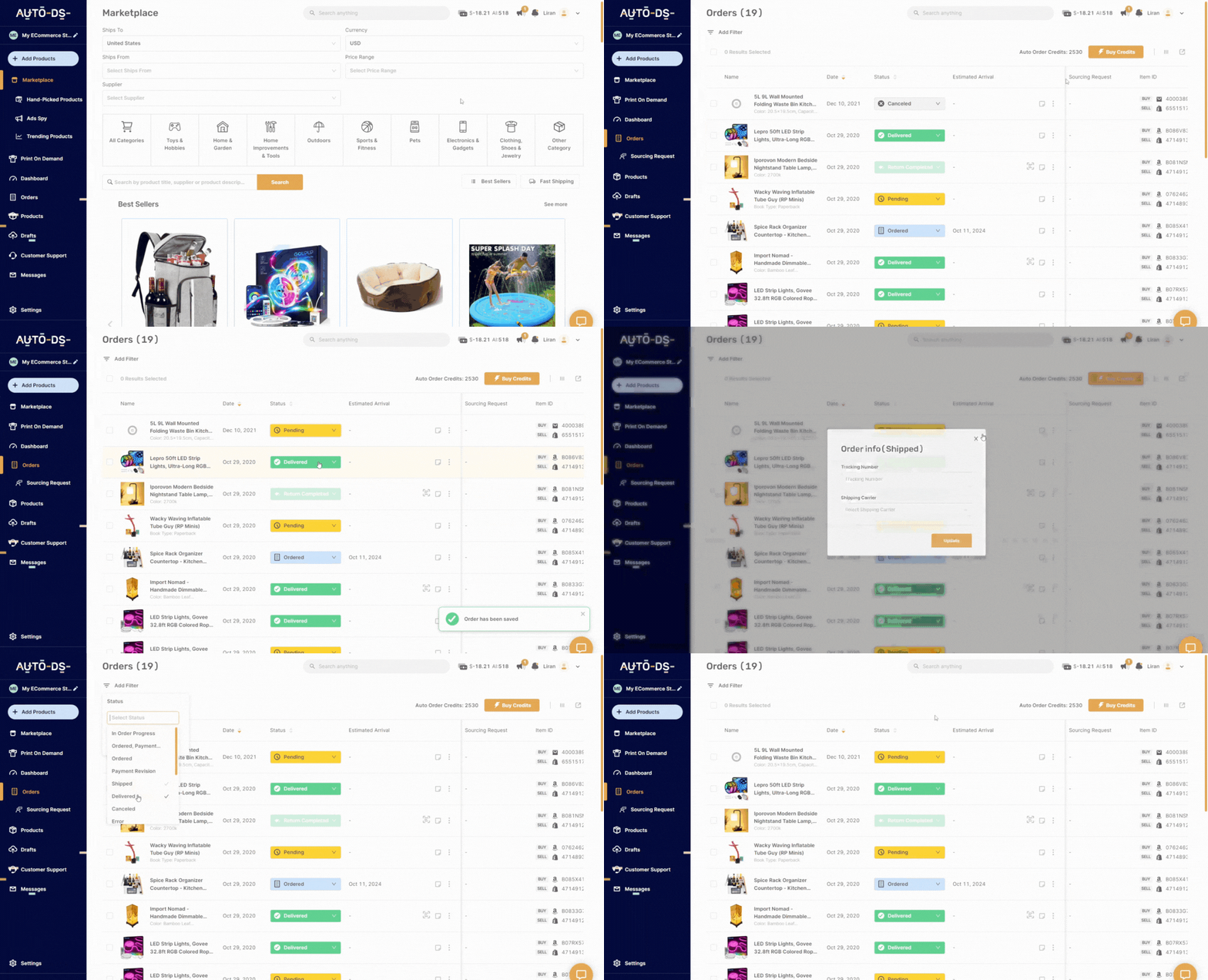
With Fulfilled by AutoDS, tracking information typically becomes available within 24–48 hours after an order reaches the Ordered status. AutoDS also checks for tracking updates every 6–12 hours. Automated order processing and tracking require the Orders Processor add-on.
However, AutoDS isn’t a customer-facing tracking page. It handles tracking information in the background, while Shopify’s shipping notifications or a dedicated tracking app keep customers informed. Make sure your Shopify shipping notifications are properly configured so buyers can receive their tracking details.
If you’re using a tracking app alongside Shopify’s notifications, review which tool sends each shipping update to avoid sending duplicate messages.
📝 For more details, check out this AutoDS tracking and fulfillment guide.
International And Dropshipping Tracking: Why It Looks Stuck
Of course, things can get a little more complicated when it comes to international shipping. Tracking information may sometimes look confusing, even when a package is moving normally. Why? Because overseas shipments often pass through multiple carriers, customs checkpoints, and transit facilities before reaching their destination.
Let’s look at some common tracking issues customers might contact you about, why they happen, and how to handle them.
1. An Unfamiliar Foreign Carrier
This usually happens because the origin carrier handles the first part of the journey before handing the package over to a local delivery service. You should check the carrier’s tracking page and look for information about a possible handoff to another provider.
What should you tell your customer?
Your package is currently being handled by [carrier name], our international shipping partner. Once it reaches your country, it may be transferred to a local carrier for final delivery. You can follow its progress here: [tracking link].
2. No Tracking Updates For Days
If a customer hasn’t received tracking updates for several days, the first scan may be delayed, or the package could be going through customs or moving between carriers. Go check the last available scan, the estimated delivery window, and any updates from customs or the shipping carrier.
What should you tell your customer?
“The last tracking update was on [date]. International shipments can sometimes go several days without a new scan, especially during customs processing or carrier transfers. We’re monitoring your shipment, and if there’s no update by [date], we’ll contact the carrier to investigate.”
3. Tracking Shows “Not Found”
This usually means the tracking number hasn’t been activated yet, or the tracking platform has selected the wrong shipping carrier. You should verify the tracking number with your supplier and manually select the correct carrier if necessary.
What should you tell your customer?
“Your tracking number is [number], but the carrier hasn’t registered an update yet. We’re checking that the number and carrier are correct. We’ll follow up with you by [date] and provide an updated tracking link if needed.”
How To Prevent Tracking Confusion
It might sound obvious, but clear and honest communication makes a huge difference. Put yourself in your customers’ shoes: you’ve spent money on something you’re excited to receive, and suddenly you have no idea where in the world your package is.
Keeping customers informed and addressing their concerns can help build trust and encourage them to shop with you again. The best approach is to set clear expectations from the beginning. Here are a few simple ways to do that:
- Show realistic delivery estimates before checkout: Let customers know how long international shipping typically takes, including potential delays.
- Explain tracking delays in your confirmation email: Mention that the first tracking scan can take several days to appear.
- Use a tracking page with translated status updates to make international shipping information easier to understand.
- Send proactive updates when needed: Set a reasonable threshold for shipments without new scans, then contact the customer and investigate the delay.
- Have a clear reshipping or refund policy: Explain what happens when a package is significantly delayed or confirmed lost.
💡 Pro Tip: Need help setting up your store policies? Check out our Shopify shipping policy template and Shopify refund policy template to clearly communicate delivery expectations and your approach to shipping issues.
Do Tracking Apps Actually Reduce Support Messages?
Yes, tracking apps can help reduce customer support messages, especially those asking “Where is my order?” (WISMO). However, there’s no universal percentage that applies to every Shopify store.
The reason is simple: when customers can check their order status through a tracking page and receive proactive shipping updates, they have fewer reasons to contact support. Still, the results depend on factors like shipping times, carrier reliability, and how clearly you communicate delivery expectations.
But of course, you may want to know if it’s working for your store, so you can try this simple approach:
- Track your current WISMO messages: Count how many shipping-status inquiries you receive over two to four weeks.
- Calculate your baseline: Divide the number of WISMO messages by the number of orders during that period, then multiply by 100.
- Install a tracking app: Enable your tracking page and shipping notifications.
- Measure again: Repeat the calculation over a similar period after implementing the app.
- Compare the results: If you’re receiving fewer WISMO messages per 100 orders, your tracking setup may be helping reduce support requests.
How To Choose A Tracking App
With so many Shopify tracking apps available, choosing the right one can feel overwhelming. But you don’t need the app with the longest feature list. You need one that fits your store’s shipping needs and budget.
Here are a few aspects to consider before making your choice:
- Free plan limits vs. your order volume: Check how many orders or shipments the free plan covers each month. Remember that some apps count individual shipments, so one order with multiple packages may use more than one credit.
- Costs beyond the free limit: Review the starting paid price, additional shipping fees, and what happens when you exceed your monthly allowance. A cheap plan isn’t always the most affordable as your store grows.
- Carrier coverage: Make sure the app supports the shipping carriers your suppliers use, especially if you’re dropshipping internationally.
- Branding and languages: Look for a customizable tracking page that matches your store’s design and offers translated tracking updates for your target markets.
- Email and SMS notifications: Check whether the app sends automatic shipping updates, which events trigger them, and whether these features are included in your plan.
- Store speed and app overlap: Avoid installing multiple apps that perform the same tasks. Check whether your existing tools already handle tracking notifications, and test your store’s loading speed after installing a new app.
Frequently Asked Questions
Does Shopify Have Built-In Order Tracking?
Yes. Shopify includes free order tracking through shipping confirmation emails, order status pages, and the Shop app. Customers can check their shipment’s progress using tracking links, while Shop users can receive delivery notifications for supported carriers.
How Do I Add A Tracking Page To My Shopify Store?
Install a tracking app like 17TRACK, AfterShip, or Track123 from the Shopify App Store. Enable its tracking page, customize it with your branding, and add a “Track Your Order” link to your store’s navigation or footer.
What’s The Best Free Shopify Order Tracking App?
It depends on your order volume and shipping needs. 17TRACK, AfterShip, and Track123 offer free plans covering up to 50 shipments or orders per month, while CWILL offers 20 orders. Compare carrier support, notifications, and upgrade costs before choosing.
Why Does My Dropshipping Order’s Tracking Look Stuck Or Show A Foreign Carrier?
International shipments often pass through multiple carriers and customs checkpoints. A foreign carrier may handle the first part of the delivery, while tracking gaps can occur during transfers or due to delayed scans. Check the carrier’s tracking page and estimated delivery window before assuming there’s a problem.
Do Tracking Apps Actually Reduce Customer Support Messages?
They can. Branded tracking pages and proactive shipping notifications make it easier for customers to check their orders without contacting support. Results vary, so compare the number of WISMO inquiries per 100 orders before and after installing an app to measure the impact.
What’s The Difference Between Shopify’s Shop App Tracking And A Dedicated Tracking App?
Shop provides free order tracking and delivery notifications through Shopify’s customer app. Dedicated tracking apps add customizable tracking lookup pages on your store, broader carrier support, and more control over shipping notifications, depending on the app and plan.
Better Tracking, Fewer “Where’s My Order?” Questions
Keeping customers informed about their orders doesn’t have to be complicated. Shopify already offers free tracking features, and dedicated apps can help you take things further with branded tracking pages, proactive updates, and additional carrier support.
As we saw, the key is finding a solution that fits your store’s needs, budget, and shipping volume. If you’re dropshipping internationally, clear delivery expectations and honest communication are just as important as the tracking technology itself.
After all, customers shouldn’t have to contact you every time they want to know where their package is. Make tracking easy, accessible, and transparent, and you’ll be one step closer to building a store people can trust.
And hey! If you haven’t launched your Shopify store yet, why not start today? With BuildYourStore, you can create your own online store for free and focus on what matters most: growing your business.
Want to keep learning? Check out our related articles for more Shopify tips, tools, and strategies to help your store succeed: