
You can start dropshipping for free, with $0 upfront. The costs show up once you start making sales. Anyone promising a “100% free dropshipping business with guaranteed profits” is leaving out a few important details.
You can test your first product without buying inventory, subscribing to expensive software, or running ads. With the right tools, you can research a niche, find suppliers, and build a basic storefront without spending anything.
Here’s how to start dropshipping for free, which platforms let you sell without a monthly subscription, and when the first expenses show up.
Can You Really Start Dropshipping for Free?
Yes, because dropshipping removes the need to buy inventory in advance. You list products supplied by another business, customers place orders, and you pay the supplier to ship them directly to customers. This makes dropshipping one of the easiest e-commerce models to test on a limited budget.
You’ll spend more time handling tasks yourself, and costs like payment processing, shipping, and marketplace fees still apply. Plus, although customers typically pay before you order from your supplier, their payment might not reach your bank account immediately. You’ll need a way to cover fulfillment while waiting for the payout.
What’s Free vs. Where Free Runs Out
Here’s where you can save money upfront, along with the expenses that tend to appear later.
| What's free to start | Where free runs out first |
|---|---|
| Shopify's temporary trial | Monthly subscription |
| Suppliers like CJdropshipping | Product and shipping costs |
| Free store themes | Premium themes or paid apps |
| Google Trends and Meta Ad Library | Advanced research tools |
| Organic TikTok, Instagram, Pinterest | Paid advertising |
| Free store subdomain | Custom domain |
| Free marketplace or store plan | Selling and payment fees |
| Supplier product images | Samples and original content |
These costs are manageable when you plan for them. There’s no need to buy extra tools before you’ve tested your idea.
How to Start Dropshipping for Free, Step by Step
Keep your setup simple: one niche, a handful of products, and one sales channel. You can expand once you’ve learned what customers respond to.
1. Validate a Niche With Free Research Tools
The biggest mistake you can make with a $0 budget is spending days building a store around something nobody wants.
Start with Google Trends, a free tool that shows how search interest changes over time. Search for a product category, select your target country, and compare related searches. You’re looking for signs of consistent demand or growing interest.
Then check two more free resources:
- Meta Ad Library: Search for businesses advertising similar products on Facebook and Instagram. This helps you study marketing angles and competing offers, although it doesn’t reveal their profits.
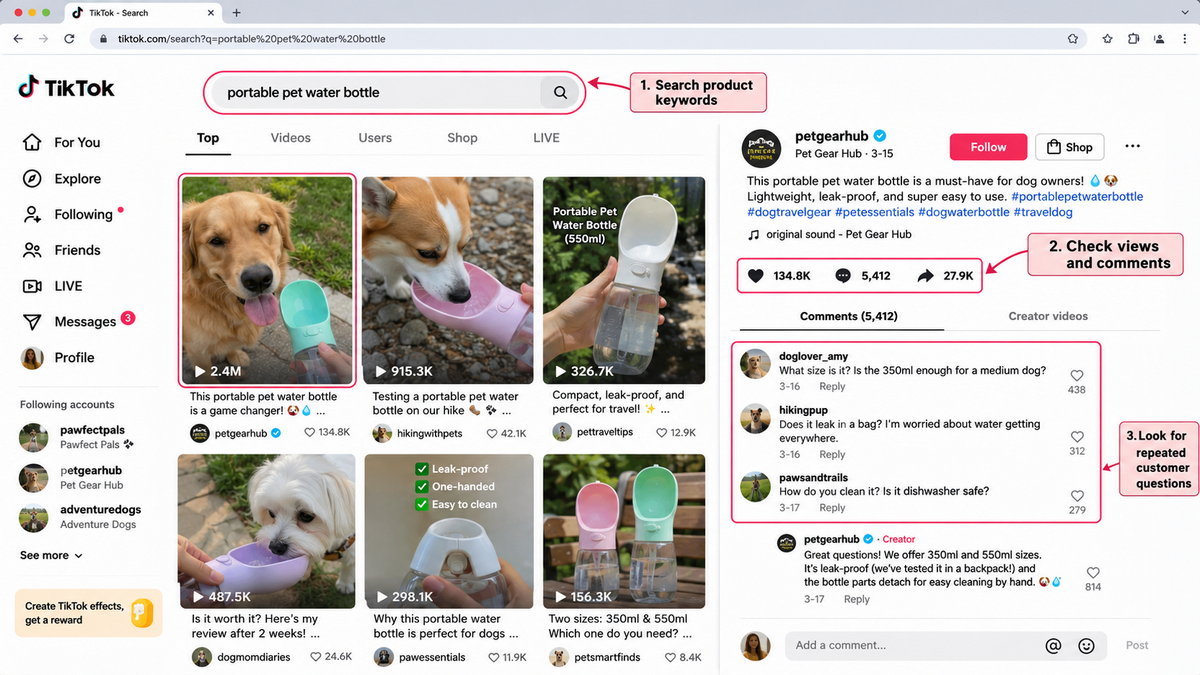
- TikTok: Search for product demonstrations, customer questions, and recurring problems people want solved. Look at the comments as carefully as the views.
Say you’re researching pet accessories and notice that videos of portable pet water bottles attract questions about size, leaks, and cleaning. Those questions can help you choose products and write better descriptions. Just remember that views and likes don’t necessarily turn into purchases.
Costs could begin here if you upgrade to paid research platforms, buy samples, or test products with ads.
🔍 Research Tip: Create a simple Google Sheet with three potential products. Record the selling price, supplier cost, shipping time, competing offers, and customer questions. This gives you a useful starting point without paying for research software.
2. Pick a Supplier With No Upfront Fees
Next, find someone who can fulfill individual orders without requiring you to purchase inventory in bulk.
Two accessible options are:
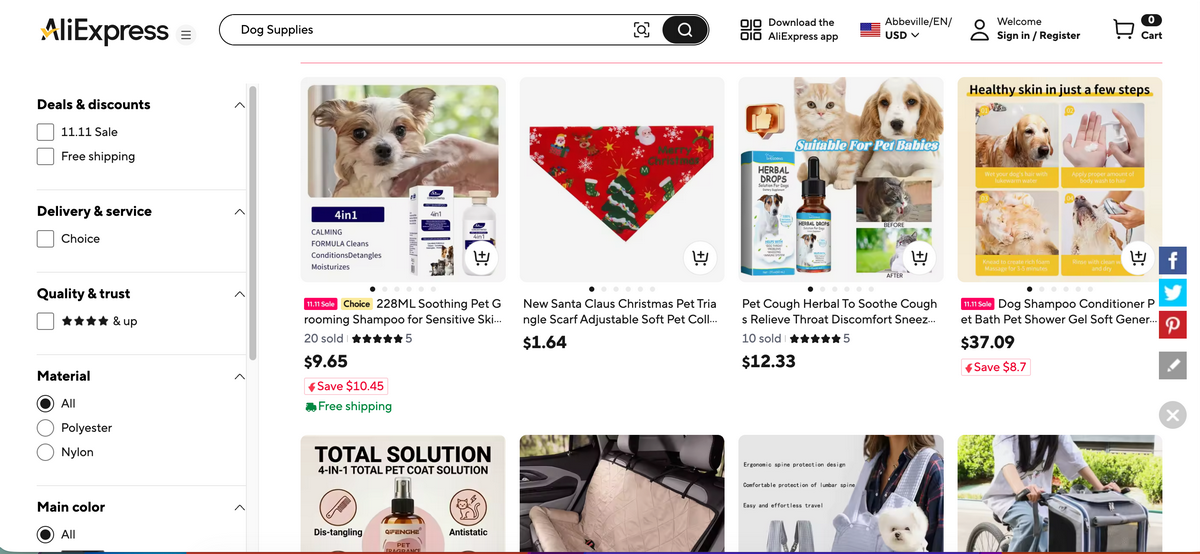
- AliExpress: Free to browse and source products from individual sellers. You pay for the item and shipping when placing an order. Check whether each seller supports dropshipping and can reliably deliver to your target market.
- CJdropshipping: Offers free registration, product sourcing, and basic store connections without a mandatory monthly subscription. You pay product, shipping, and applicable service costs when orders are fulfilled.
For a more detailed checklist, see this guide on how to find dropshipping suppliers.
Compare at least two suppliers for your main product. Look at recent reviews, shipping costs, processing times, return conditions, and whether the seller can ship a single unit directly to your customer. Low prices lose their appeal quickly when delayed deliveries lead to refunds.
You’ll pay just when you order a sample or purchase inventory to fulfill a customer’s order. Optional supplier services may cost extra, too.
📦 Supplier’s Tip: Ask suppliers about their return policy and how they handle damaged items before listing anything. If you can’t afford a sample yet, be transparent with yourself about the product-quality risk you’re accepting.
3. Decide Where Your Store Lives
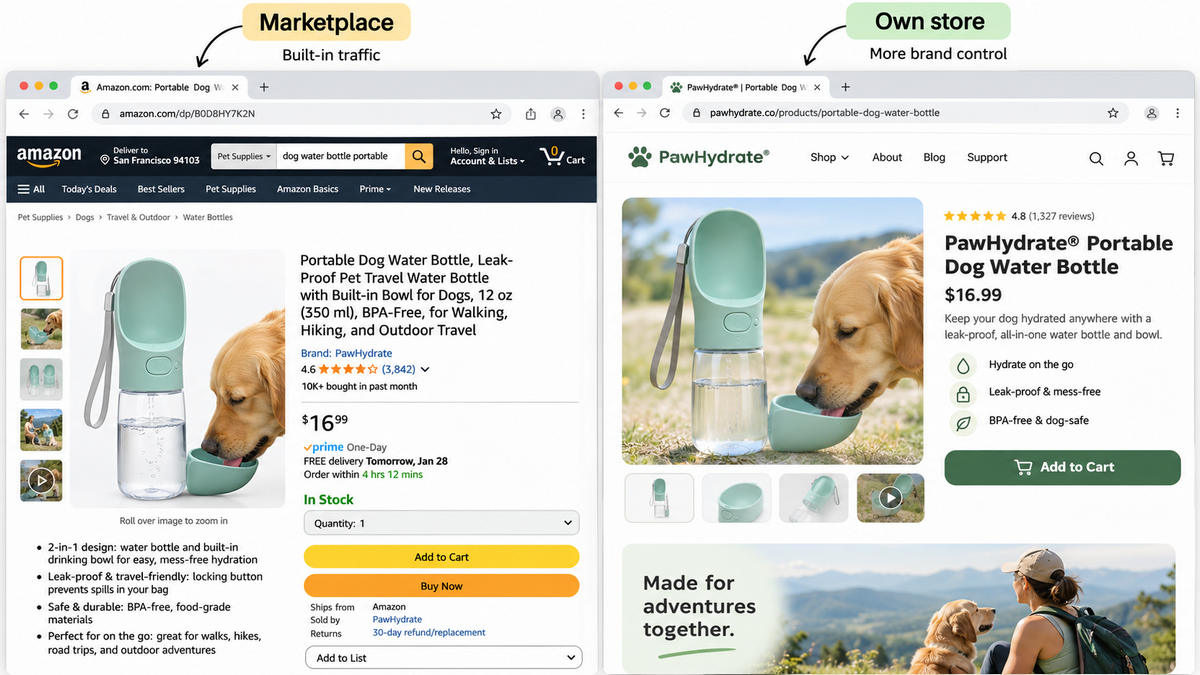
Once you have a supplier in mind, choose where customers will buy your products.
You have two main options: use a marketplace that charges when you sell, or build an independent online store.
Marketplaces can be useful when you’re testing demand with no subscription budget. However, they have their own selling rules, and some fulfillment methods aren’t permitted. An independent store gives you greater control over branding, product pages, and the customer experience. Shopify is a popular option, although its free trial is temporary.
Price is only part of the decision. Check whether your supplier’s fulfillment method is allowed, whether you can accept payments in your country, and what fees apply. I’ll compare the free store options in more detail below.
When does it stop being free? Marketplaces may charge listing or selling fees, while paid e-commerce platforms require a subscription once their trials end.
4. Build Your Storefront With Free Assets
You can create a surprisingly polished storefront without spending money on design.
Start with a free theme, use your platform’s built-in editor, and create basic branding with Canva’s free plan. You can also use supplier photos when you have permission, although original images are better for showing exactly what customers will receive.
Make sure your storefront covers four essentials:
- Product pages: Clear titles, useful descriptions, accurate specifications, and delivery estimates.
- Store navigation: Simple menus and categories that make products easy to find.
- Trust information: Contact details, shipping policies, and transparent return conditions.
- Mobile experience: Check that images, product options, and checkout are easy to use on a phone.
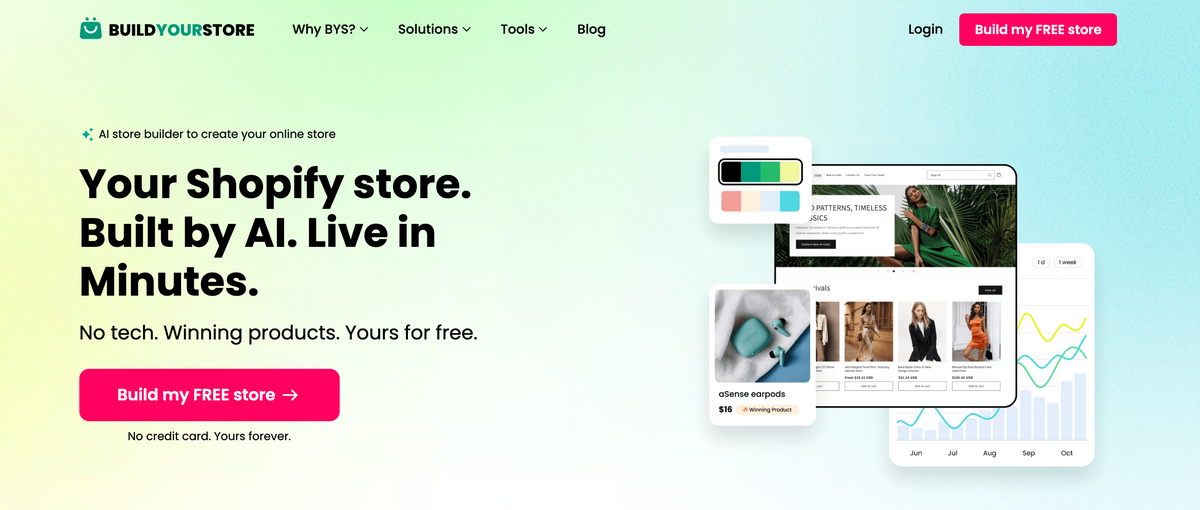
If building every page from scratch sounds like too much work, BuildYourStore offers a faster starting point. Its free AI builder sets up a customizable Shopify storefront with products and product pages already added. You can create your free store here and customize it to match your brand. Just remember that Shopify’s subscription and any fulfillment costs are separate.
🆕 Beginner’s Tip: Start with three to five carefully chosen products instead of uploading an entire supplier catalog. A smaller selection is easier to maintain, and you can give each product page the attention it deserves.
The expenses here are optional upgrades: a custom domain, premium theme, paid design assets, or extra apps.
5. Drive Traffic Without Ads
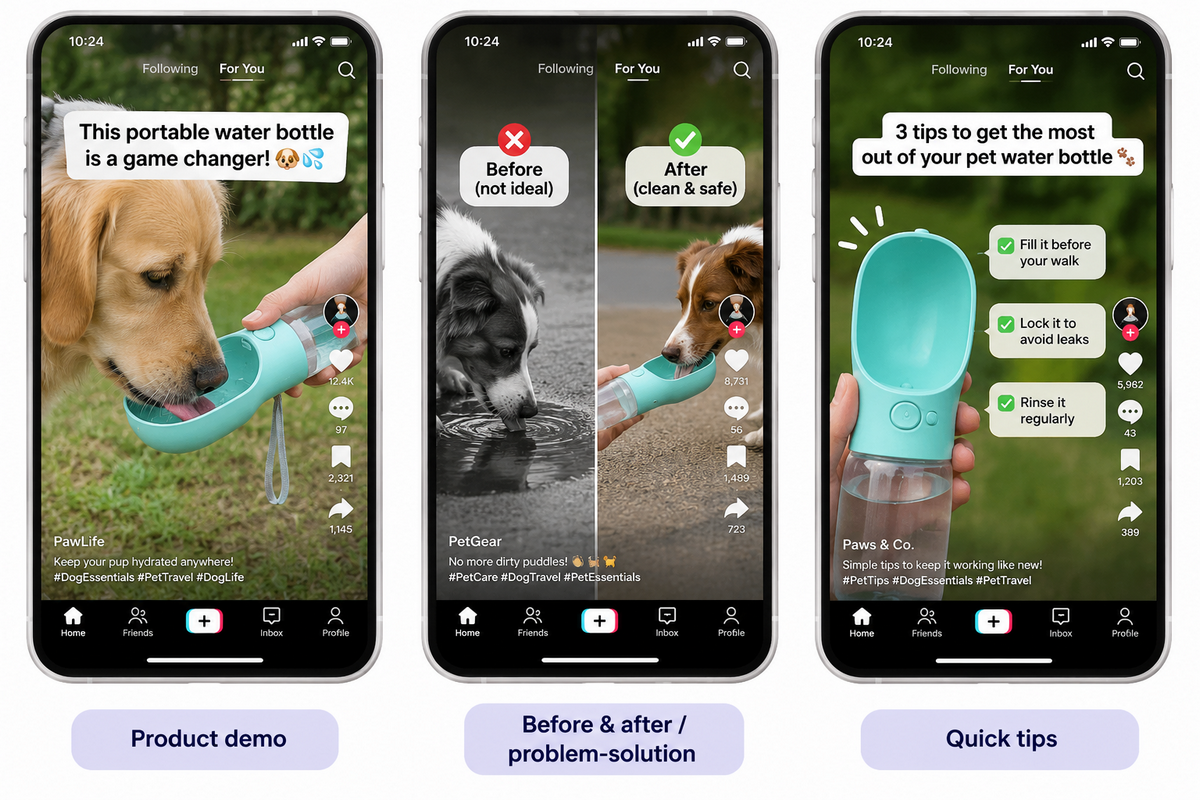
A free store isn’t much use if nobody visits it. Luckily, you have ways to attract potential customers without buying advertising space.
Depending on your niche, TikTok, Instagram Reels, and Pinterest are good places to start. Instead of repeatedly posting product pictures, create content around the problems your products solve.
For example, if you’re selling desk organizers, your content might include a messy-desk transformation, a comparison of different storage solutions, or a simple workspace setup tutorial.
Try these free marketing tactics:
- Short-form videos: Demonstrate products, explain their uses, and answer common questions.
- Pinterest posts: Create helpful visual content that links to relevant product pages.
- Online communities: Participate in conversations and share your store only when it’s relevant and allowed.
- Basic SEO: Write product titles and descriptions using phrases customers actually search for.
Without a sample, filming your own product demonstrations gets tricky. You can initially create educational content, use authorized supplier material, and study customer needs.
Organic marketing is free in money, but it can be demanding in time. Don’t expect every video to go viral just because you’ve added a trending sound.
A marketing budget comes into play when you buy samples for content, hire creators, or run paid campaigns.
6. Fulfill Your First Order
Your first order is also your first real test of the numbers. Suppose a customer purchases a product for $30. Your supplier charges $12 for the product and $5 for shipping. You also incur an illustrative $1.20 payment-processing fee.
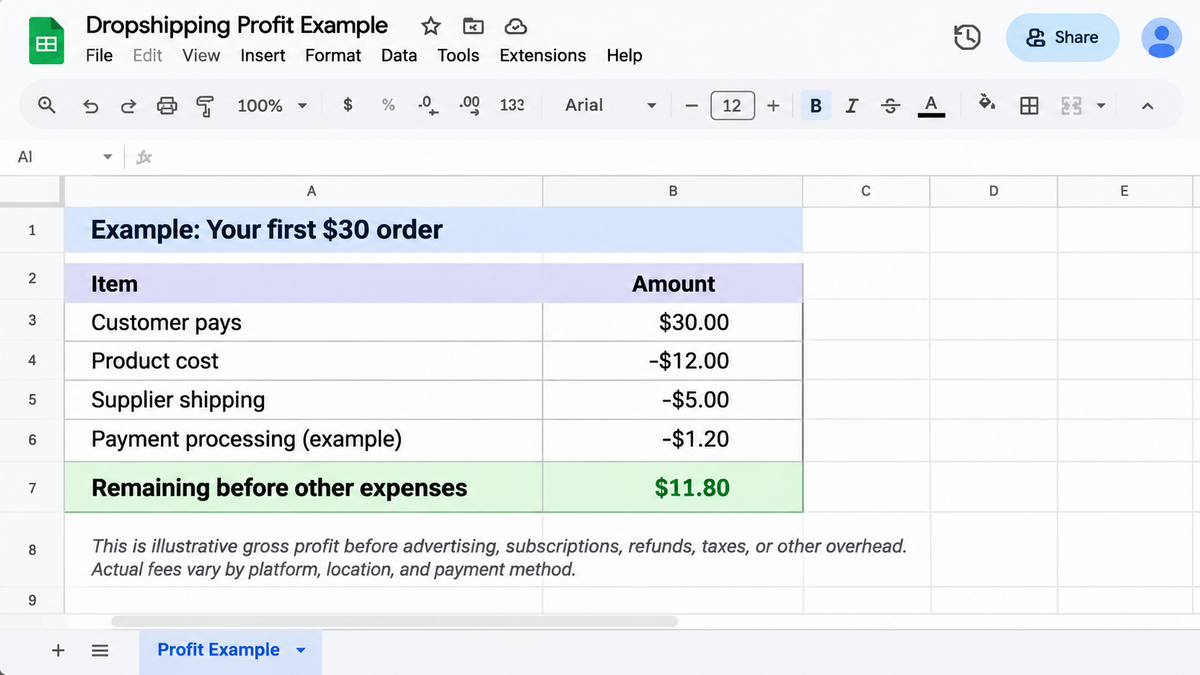
This is illustrative gross profit before advertising, subscriptions, refunds, taxes, or other overhead. Actual fees vary by platform, location, and payment method.
That $11.80 looks encouraging, but you may have to pay the supplier’s $17 before your customer’s payment clears.
Once the supplier accepts the order, follow the shipment, share tracking information when available, and keep the customer informed about delivery. At this stage, you’ll also be responsible for any problems: late packages, damaged items, cancellations, or refunds.
💰 Financial Tip: Keep a small fulfillment buffer as soon as possible. Even profitable orders can create cash-flow problems if your payment provider takes several days to release funds.
The first sale triggers supplier fulfillment costs and any applicable payment or marketplace fees. Other charges depend on where you sell.
How to Create an Online Store for Free
If you’re wondering how to create an online store for free, the answer depends on what you mean by free.
Some platforms let you keep a basic store running without a monthly subscription. Others give you a temporary trial of a paid service. Both can be useful, but they work differently.
Genuinely Free Platforms: No Monthly Subscription
These options allow you to get started without paying a recurring platform fee, although selling costs and restrictions still apply.
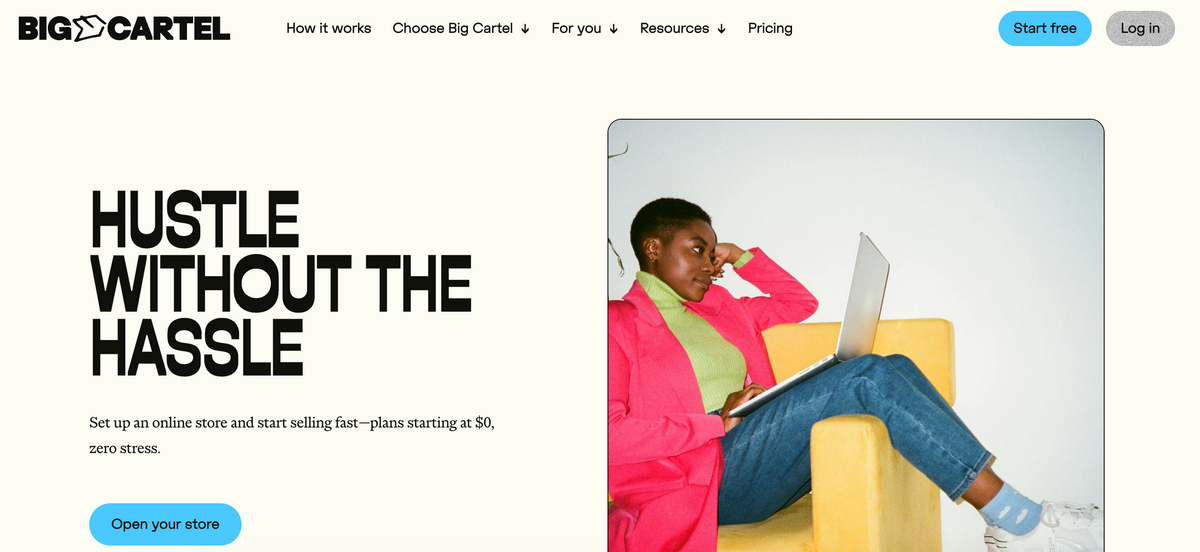
- Big Cartel: Its free Gold plan supports up to five product listings and accepts online payments. It’s a useful option for a tiny catalog, although the free tier has limited features and doesn’t offer native dropshipping automation.
- Square Online: Offers a free online selling option in supported markets, with payment processing fees when customers buy. Check country availability and whether its fulfillment setup works for your supplier.
- eBay: Offers limited free listings in many markets and typically charges fees when items sell. eBay allows dropshipping if you own the products or have an agreement with a wholesale supplier before listing them. Buying from another retailer or marketplace after a customer orders isn’t allowed.
- Facebook Marketplace: Can be used to test local product demand without a storefront subscription. However, shipping, checkout availability, fees, and eligibility depend on your location and account. Local listings aren’t a straightforward substitute for a supplier-fulfilled online store.
- TikTok Shop: Eligible sellers can open a shop without a standard monthly storefront subscription, but selling fees apply. Traditional dropshipping without inventory isn’t automatically allowed: sourcing and fulfillment rules vary by market, so check them before listing products.
Each option works a little differently. Big Cartel gives you a small independent storefront, while marketplaces provide access to existing shoppers but impose more rules on how you sell and fulfill orders.
For a tiny independent store, Big Cartel is worth considering. To test sales on a marketplace, eBay can work with a compliant wholesale supplier.
Free Trials of Paid Platforms
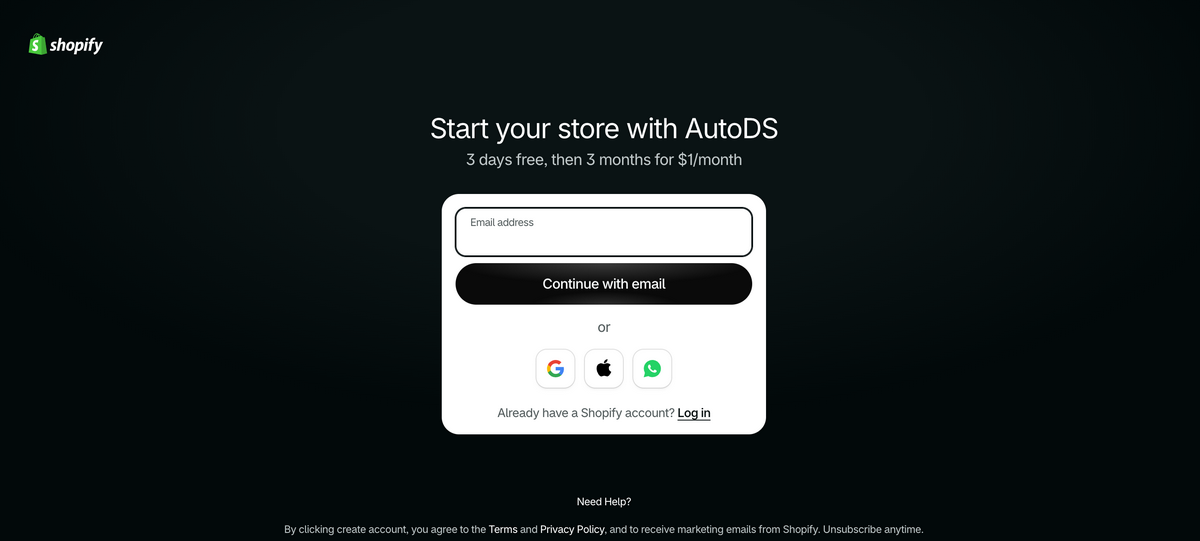
Shopify takes another approach. It lets you build an online store during a temporary trial, but keeping that store operational requires a paid plan.
As of November 2026, Shopify advertises:
- First 3 days: Free trial, no credit card required to sign up.
- Following 3 months: $1 per month for eligible introductory plans.
- After the promotion: Standard subscription pricing, starting at $29 per month for Basic with annual billing in the US.
Shopify
During the free trial, your store initially has a restricted or inactive checkout. You’ll need to select a paid plan and configure a payment provider to begin accepting real orders.
Spend those first three days choosing a theme, importing products, preparing your policies, and checking how everything looks. Then, if you’re eligible for the $1 promotional months, that’s your real opportunity to test live sales without paying the standard Shopify subscription yet.
Which Should You Pick?
- Want to test a product without a monthly subscription? A free storefront or a marketplace that permits your specific sourcing and fulfillment setup can help you gauge demand. Check those rules first; not every marketplace supports traditional dropshipping.
- Want to build a recognizable brand you can keep growing? Shopify’s trial and introductory pricing are a better fit. You get more control over the customer experience, design, and store structure. For the full walkthrough, check out this Shopify store setup guide.
When Does a “Free” Dropshipping Store Start Costing Money?
Here’s how expenses can unfold if you use Shopify and qualify for its promotional pricing.
Day 1: $0
Research products, compare suppliers, and begin building your store with free themes and tools. You don’t need to purchase inventory or run advertisements.
Day 4: From $1/month
Your three-day Shopify trial ends. If you’re eligible, you can activate the introductory $1/month offer and prepare to accept real orders. Payment processing fees will apply when customers buy.
First sale: Variable costs
You pay for the product and shipping, plus any applicable transaction or marketplace fees. You may need available funds before your customer’s payment reaches your bank account.
Month 4 after the trial: Standard pricing
After the three promotional months, your Shopify subscription moves to its applicable regular price unless you change or cancel the plan. By now, you’ll want enough evidence of demand to justify the expense.
If you’re using a genuinely free store plan instead, you won’t have the same subscription timeline. Your main expenses will arrive through orders, payment processing, and optional upgrades.
If You Have $20–50, Spend It in This Order
Having $20–$50 available doesn’t mean you need to spend it all on day one.
- Custom domain first: A memorable domain gives your brand a more professional address. Prices vary by extension and registrar, so compare renewal costs too. If you’re building on Shopify, there are also ways to get a Shopify domain without immediately purchasing a custom one.
- Product sample second: Testing quality, packaging, and delivery can save you from selling something that disappoints customers. A sample matters more than decorative upgrades, especially when photos don’t tell you much about quality.
- Paid ads last: Start spending on advertising only when your product pages, supplier process, and profit calculations make sense. A tiny budget won’t fix a weak offer.
One exception: if you don’t have enough money to pay for your first supplier order, keep that cash available for fulfillment instead. A custom domain can wait. An order that you can’t fulfill cannot.
Red Flags in “100% Free Dropshipping” Offers
Free resources can be genuinely useful. But this niche also attracts people selling the online-business equivalent of an infinite-money cheat code.
These are the warning signs worth checking:
- Guaranteed profit claims: Nobody can promise that your store will make money. Product demand, marketing, expenses, and execution all affect the outcome.
- Free courses with aggressive upsells: A free tutorial that eventually promotes an optional paid course isn’t automatically suspicious. But pressure to buy a $997 program to access supposedly essential information is a reason to reconsider.
- Free stores tied to one expensive supplier: Some offers restrict where you can source products or quietly build large markups into supplier prices. Compare the total cost of fulfillment before accepting.
- Hidden recurring charges: Watch for subscriptions that activate after a trial, paid apps added during setup, or features that become inaccessible unless you upgrade.
- No explanation of order fulfillment: If a platform promises a completely automated business without explaining who pays for products, who handles refunds, and how shipping works, something important is missing.
A legitimate free offer should explain its limitations clearly. You shouldn’t need to provide payment details just to find out what the supposed free service actually includes.
Frequently Asked Questions
Can you really start dropshipping with no money at all?
Yes, you can research products, find suppliers, and set up a basic storefront without paying upfront. However, you’ll need money to fulfill orders, cover applicable transaction fees, and handle potential refunds. Some selling platforms also require subscriptions once their free trials end.
What’s the catch with “free” dropshipping platforms?
Most free platforms have limitations. These may include restricted product listings, basic designs, limited integrations, or payment processing fees. Some also offer only temporary free trials. Before signing up, check what happens when you receive an order and whether the platform supports your fulfillment method.
Is Shopify’s free trial enough to actually test a store?
Shopify’s three-day free trial is enough to explore the platform, customize a theme, and prepare product listings. However, you generally need to select a paid plan to activate checkout and accept real orders. Eligible sellers can then use Shopify’s introductory $1/month promotion for three months to test live sales at a lower subscription cost.
What’s the best free way to create an online store?
Big Cartel’s free Gold plan is a useful option for a small independent storefront with up to five products. Marketplaces like eBay may also work if you comply with their dropshipping policies. Shopify is better suited to building a more customizable branded store, but its free access is temporary.
Which suppliers let you start without paying anything upfront?
AliExpress and CJdropshipping both allow you to explore products without purchasing inventory upfront. CJdropshipping also offers free registration and basic sourcing services. With either option, you’ll pay for products and shipping when placing supplier orders, and additional services may carry charges.
At what point does a “free” dropshipping store start costing money?
Costs can begin when you order a product sample, purchase a domain, subscribe to a paid platform, or receive your first customer order. Even if your storefront has no monthly subscription, you still have to account for supplier payments, shipping, and applicable selling or payment-processing fees.
Conclusion
Starting dropshipping for free is a smart way to test an idea, especially when you’re still learning how products, suppliers, and online stores work together. Free research tools, supplier catalogs, and organic marketing give you plenty of room to experiment before committing to expensive software.
Eventually, doing everything by hand can eat up time you’d rather spend finding products or reaching customers. If you’re ready to create a more professional Shopify store without spending hours choosing a theme, organizing pages, and adding products, an AI store builder can make that transition easier.
For example, BuildYourStore can create an initial Shopify storefront with a customizable design and preloaded products at no charge. Shopify’s own subscription, fulfillment expenses, and any optional paid tools remain separate costs.
If you’re ready to keep going, these guides are worth bookmarking: